

Burning Man STEP Program Guide — How to Buy, Sell, and Transfer Tickets Safely
STEP (Secure Ticket Exchange Program) is the official, Burner‑Profile‑based marketplace for returning, reselling, and transferring Burning Man tickets after the main sale close, protecting buyers and sellers from fraud. Success on STEP depends on verified Burner Profiles, timely action during reallocation drops, clean documentation for transfers, and safe payment practices (3D Secure/OTP).Knowing transfer rules, waitlist mechanics, refund procedures, and common scam red flags turns a risky chase into a reliable path to Black Rock City.
The moment a returned Burning Man ticket appears, hundreds are ready to claim it and that’s where STEP becomes essential. Many hopefuls chase returned tickets through informal channels or risky resellers and lose money, time, or access; others miss legitimate STEP windows because their Burner Profile wasn’t verified or their payment method failed.
We are here to explain how STEP works end‑to‑end: creating and securing a Burner Profile, spotting official STEP drops and reallocation waves, safely buying or listing tickets, and handling refunds or disputes. It covers buyer and seller workflows, transfer rules for vehicle passes and add‑ons, waitlist behavior, and international payment pitfalls (currency conversion, bank holds).
Practical checklists, sample messages, and fraud‑avoidance steps help U.S. users and international applicants move confidently from “I missed the sale” to “I’m going to Black Rock City.”
In This Guide You’ll Learn
- 🔄 What the Secure Ticket Exchange Program (STEP) is
- 🎟️ Who can buy or sell tickets through STEP
- 📝 Eligibility and participation requirements
- ⏳ How the ticket matching process works
- 💳 Payments, transfers, and confirmations
- 📅 When STEP typically opens and closes
- ⚠️ Common STEP mistakes to avoid
- 💡 Tips to improve your chances of receiving tickets
- 🔗 Related ticket resources for complete planning
What Is the STEP Exchange Program?
STEP (Secure Ticket Exchange Program) is the official post‑sale marketplace designed to let burners safely buy and sell Burning Man tickets at face value. It’s the community’s built‑in safety valve for returns, cancellations, and last‑minute plan changes—intended to keep transactions transparent, reduce fraud, and keep people out of the high‑risk resale jungle.
Understanding the Secure Ticket Exchange Program
STEP is a centralized, organizer‑supported platform that matches sellers who need to offload valid tickets with buyers who missed ticket sales or need specific ticket types. It’s not an ad board; it’s a managed exchange that enforces rules—face‑value pricing, identity verification where required, and automated transfers so tickets move cleanly from one account to another without manual back‑and‑forth.
In practice, that means sellers can list without chasing buyers privately and buyers can wait on official queues rather than chasing sketchy posts on social media. The platform also keeps records—payment timestamps, transfer confirmations, and communication logs—that help resolve disputes and provide proof at the gate. For organizers, STEP reduces the volume of fraudulent claims at entry and helps preserve the community norm that tickets circulate at face value.
Why Burning Man Created STEP
STEP originated because the community needed a safe alternative to the wild west of private resales. Before STEP, sellers used classifieds, social posts, or payment apps—methods ripe for scams, chargebacks, and fake tickets. STEP protects attendees, protects organizers (who otherwise absorb gate chaos), and protects the event’s ethos by discouraging profiteering through markups.
Beyond fraud mitigation, STEP also helps balance supply—returned tickets get recirculated legally, which lowers the temptation for last‑ditch, overpriced purchases and keeps more tickets in the hands of genuine participants. For many, STEP feels like a civic duty: use it to keep the marketplace honest and the playa community sustainable.
- Safe ticket transfers: STEP moves tickets through an authenticated flow that prevents hand‑to‑hand scams and fake PDF transfers.
- Fair redistribution: returned, forfeited, or reallocated tickets reenter the pool via STEP so access can be redistributed transparently.
- Community trust and transparency: audit trails, portal confirmations, and burner‑profile matching uphold the event’s integrity and gifting culture.
- Scam reduction: STEP reduces incentives for off‑portal middlemen, wire/crypto scams, and fraudulent listings by centralizing transfers on official infrastructure.
How STEP Protects Buyers and Sellers
STEP’s protections operate on both technical and policy levels. Technically, transfers are automated and logged; the buyer’s account becomes the ticket holder in STEP’s system, which gate staff can verify. Financially, STEP typically handles authorizations and holds through secure payment processors, which reduces the chance of fraudulent chargebacks.
Policy-wise, STEP enforces face‑value rules and identity checks on ineligible transfers, and it provides a support channel to mediate disputes giving both buyers and sellers recourse that private trades lack. For sellers, this means fewer chargebacks and safer payouts; for buyers, it means reduced risk of being denied entry because the ticket was counterfeit or already transferred. The platform’s transparency, timestamps, transfer confirmations, and documented communications also deters bad actors.
Who Should Use STEP
STEP is for several groups: people who missed ticket sales and want a legitimate, face‑value route in; sellers who need to recoup costs without risking scammers; camp leads managing last‑minute roster changes; and travelers who need reliable documentation for visas or travel reimbursement.
If you value certainty and gate legitimacy over speed or the chance of a discount (often illusory), STEP is the correct channel. That said, STEP is not the fastest possible route private trusted trades can be quicker, and some resellers move inventory faster (at a higher cost) but those speed advantages come with significant legitimacy risk.
- Buyers who missed initial sales (OMG, Community Sale, Last Chance) and watch reallocation drops.
- Sellers who can no longer attend and need a safe, face‑value or regulated resale path.
- International participants looking for returned tickets without relying on risky foreign resellers.
- Theme camps and block‑ticket holders coordinating transfers to new camp members or guests.
- Regional burn groups and volunteers that help redistribute tickets within community networks (while respecting STEP rules).
Why STEP Is Safer Than Social Media Resales
- Reduced fake‑ticket risk: official transfers render copied PDFs useless because gate access is matched to the STEP‑registered profile and ticket ID.
- Verified transfer system: STEP requires both buyer and seller Burner Profiles, reducing anonymous transactions and impersonation.
- Official account tracking: transfers occur inside the ticketing portal so ticket history and ownership are recorded by the Burning Man Organization (BMO).
- Payment protection: STEP integrates with secure payment rails and advises 3D Secure/OTP‑capable cards, lowering chargeback and fraud risks compared with direct bank wires or crypto.
“STEP turns chaos into a controlled window—verified profiles and official transfers protect both buyers and sellers on the path to Black Rock City.”
Download the STEP Quick Start Checklist
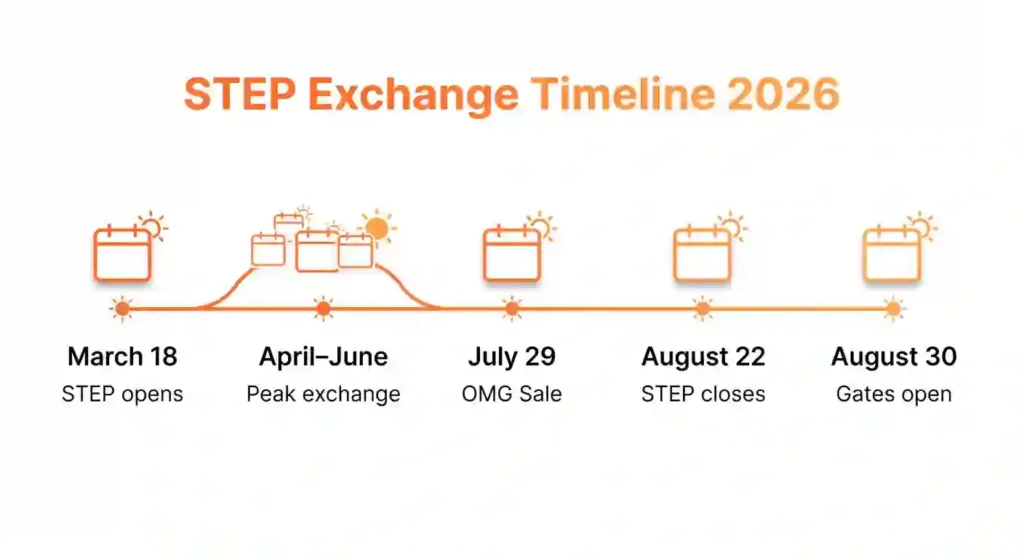
When STEP Opens and Closes
STEP windows vary by year and by ticket type. Practically, STEP typically goes live after the main sales close and remains active through pre-event drops, handling returns and exchanges as plans change. Some ticket types (vehicle passes, certain add-ons) may open and close on slightly different timelines, and late exchanges may be disabled close to event entry to ensure gate logistics.
A good habit: subscribe to official STEP announcements, set calendar alerts for the general STEP window, and check for special windows for vehicle passes or bundled transfers. If you’re planning on using STEP, don’t assume it’s open forever late planning reduces odds and sometimes shuts off entirely several days before arrival.
- STEP is an organizer‑managed, face‑value exchange for returned tickets.
- STEP reduces fraud, preserves fairness, and helps camps manage rosters.
- STEP windows vary—subscribe to official notices and act early when possible.
- International notes: cross‑border payments, currency conversion, visa/timing awareness for purchased tickets.
- Core system: STEP (Secure Ticket Exchange Program), Burner Profile, ticketing portal, Burning Man Organization (BMO).
- Primary benefits: secure transfers, reallocation of returned tickets, reduced scams, transparent audit trails.
- Main users: buyers (missed sale), sellers (can’t attend), camps (block transfers), international buyers, regional burn groups.
- Security elements: verified profiles, payment rails (credit/debit with 3D Secure/OTP), ticket ID mapping, portal confirmations.
- Related windows: reallocation drops, STEP/OMG/Last Chance/Community Sale; alternatives include STEP, volunteer tickets, camp sponsorships.
How Does STEP Work?
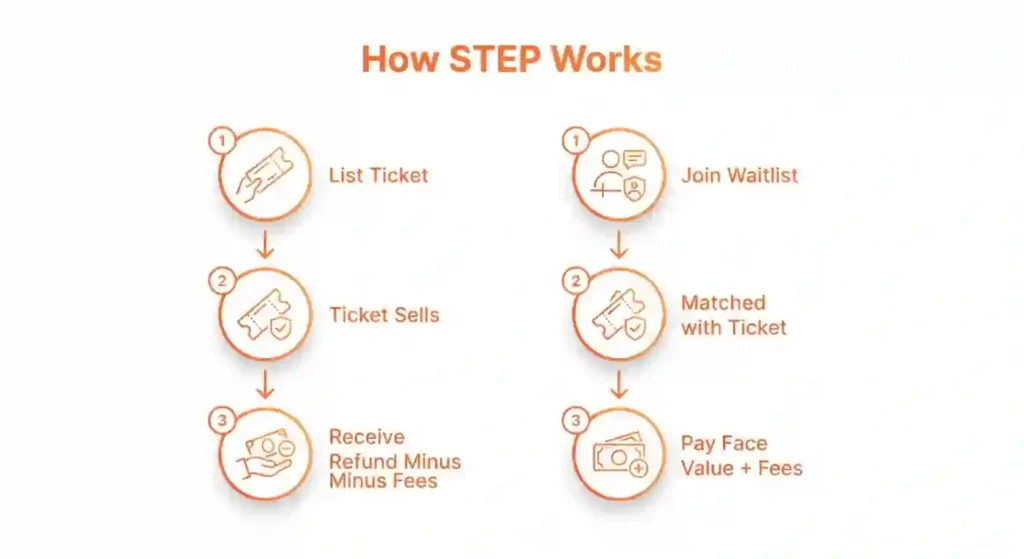
STEP follows a predictable workflow: sellers list tickets, buyers join waitlists, the platform matches supply to demand, payment is authorized and captured, and tickets transfer automatically. Each step has practical actions you can take to speed your success or avoid problems.
Basic STEP Process Overview
- Seller submits ticket: a verified seller lists a returned or eligible ticket through the official ticketing portal.
- Ticket enters exchange queue: the ticket becomes visible to the STEP system and queued for matching.
- Buyer joins waitlist or monitors drops: interested verified buyers watch for reallocation waves or join any available waitlist.
- Ticket matched automatically: the portal pairs tickets to eligible buyers based on queue rules and ticket type.
- Payment processed securely: payment is captured through the ticketing partner’s secure rails (recommended: 3D Secure/OTP‑capable cards).
- Ticket transferred officially: ownership moves to the buyer’s verified Burner Profile and the ticketing database reflects the new holder.
How Buyers Join the Waitlist
To join a STEP waitlist, log into the official STEP portal, select the exact ticket type you need (general admission, specific vehicle pass, bundled tickets), and add your payment authorization details for pre‑holds. Be precise: if you need a specific vehicle pass paired with a ticket, select that exact bundle if STEP offers it. You’ll be given a queue position and sometimes an estimated wait time.
Real-world tip: enter multiple adjacent waitlists if the system allows (e.g., general admission in addition to a specific vehicle pass) to broaden matching odds—but be careful only to authorize payment on cards you monitor closely. Record the date and time you joined so you can measure progress and estimate how slowly or quickly the queue moves compared to others who joined earlier.
When STEP Usually Opens
- Timeline after major sales: STEP and reallocation drops typically follow primary sales and known windows (Community Sale, OMG/Last Chance) — returned tickets enter STEP in the weeks and days after those events.
- Official announcements: Burning Man Organization posts official timing on burningman.org, in email alerts tied to Burner Profiles, and on verified social channels; rely on these channels for start times rather than third‑party posts.
- Practical tip: expect multiple waves (batches) rather than a single continuous opening; set calendar alerts for announced windows and stay ready during likely reallocation periods.
Step‑by‑Step Waitlist Registration
Step 1 — Burner Profile Login
Log into your verified Burner Profile on the official ticketing portal. Confirm name, email, and phone are current and match the ID you’ll use for gate entry. Unverified or mismatched profiles frequently fail to complete transfers.
Step 2 — Select Ticket Preferences
Set preferences (ticket type: GA, vehicle pass inclusion, camping/add‑ons) if the portal offers them. Be precise—STEP matches like with like (GA to GA, vehicle pass class to matching buyers), so selecting incorrect preferences can skip you for suitable tickets.
Step 3 — Add Payment Method
Add and verify a primary payment method capable of handling quick authorization: a credit/debit card with 3D Secure/OTP is strongly recommended. Enter a backup card in case of issuer holds. For international buyers, confirm with your bank that cross‑border authorizations and dynamic currency conversion are permitted.
Step 4 — Confirm Waitlist Position
Complete the portal prompts to confirm your spot on the waitlist or to subscribe to drop alerts. Save screenshots of any confirmation and note the email tied to your Burner Profile. Keep the portal open and avoid duplicate sessions—multiple concurrent logins can cause session conflicts.
Can You Request Multiple Tickets?
- Household limits: STEP limits often mirror ticketing policy—one verified profile should request only the number of tickets allowed by official rules; seeking many tickets under one profile can trigger flags.
- Camp coordination: camps managing block allocations should coordinate transfers to individual Burner Profiles in advance; use official camp links and written pledges to document agreements.
- Linked purchases: if buying multiple tickets for household members, ensure each intended holder has their own verified Burner Profile or that the portal supports multi‑ticket purchase and maps tickets correctly to profiles at transfer time.
How Long Wait Times Can Be
- Demand fluctuations: wait times depend on how many returned tickets are in the pool and how many buyers are queued; high demand windows can move in seconds, while quieter times may see weeks between drops.
- Ticket release waves: STEP typically processes tickets in batches; a single wave can clear many waitlist positions quickly or pass over some if inventory is limited.
- Unpredictable timing: because reallocation depends on returns, forfeitures, or event adjustments, there is no guaranteed cadence—stay prepared across announced windows and keep payment methods active.
Waitlist essentials
- Core items: Burner Profile verification, ticketing portal waitlist feature, ticket type preferences (GA vs add‑ons), payment readiness (3D Secure/OTP card), backup card for bank holds.
- Actions: login, confirm profile details, set ticket preferences, add/verify payment method, confirm waitlist position, save confirmation screenshots.
- Limits & coordination: one verified profile per person, coordinate camp block transfers via official camp contacts and documented agreements.
- Timing: batch drops after Community Sale/OMG/Last Chance, variable wait times, unpredictable reallocation waves.
“Being first isn’t just about speed—it’s about having the right profile, the right payment, and a clear preference saved before the drop.”
Download the STEP Waitlist Checklist
How Sellers List Their Tickets
Sellers prepare by verifying their STEP account and confirming that the ticket is transferable. Once verified, listing is a guided process—choose the tickets to list, confirm that there are no attached restrictions (charity-subsidized, promo, or otherwise locked tickets), and declare any bundles (ticket + vehicle pass). STEP may validate ownership and block double-listing.
Practical advice: don’t list impulsively—ensure you’re ready to transfer (and that you’ve removed the ticket from any dependent arrangements). Once listed, keep an eye on your dashboard for match notifications and respond quickly to STEP prompts to avoid failed matches and payout delays.
How Ticket Matching Happens
STEP’s matching algorithm typically pairs the earliest compatible waitlisted buyer with available tickets that meet the buyer’s requested criteria. Matches can be immediate if supply exists, or they can take days when supply is thin. Some systems implement additional prioritization rules—time in queue, ticket attributes, or verified buyer status—so early sign-ups often enjoy improved odds.
If you’re flexible about ticket specifics, indicate that in your request when STEP supports flexible matching, because that opens more potential matches. Pro tip: keep notifications on and consider a small window where you’ll be available to act because matches are time‑sensitive and can be lost if the buyer doesn’t respond to authorization requests.
- Queue system: STEP commonly uses an automated queue or waitlist mechanism to sequence buyers during reallocation drops; tickets are processed in batches.
- First‑come, first‑served concepts: while timing matters, some matching can include randomized elements or priority rules—be prepared and logged in ahead of drops.
- Ticket type matching: the system matches like with like (GA to GA, vehicle pass pairing) to ensure buyers receive the correct ticket category.
- Vehicle pass considerations: vehicle passes are often separate items—buyers and sellers must confirm whether a vehicle pass is included or must be purchased separately; STEP will reflect add‑on status during matching.
Payment and Transfer Process For STEP
Once matched, STEP usually pre‑authorizes the buyer’s payment method (a temporary hold), notifies both parties, and then executes the transfer once verification checks pass. After transfer, the buyer’s account officially owns the ticket and STEP completes the financial settlement—charging the buyer and queuing the seller’s payout per platform rules.
Be aware of hold periods and possible bank‑level fraud checks that can delay final capture; if your card issuer blocks unusual holds, it can cost you a match. Sellers should watch for payout windows and confirm bank details to avoid payout delays.
Completing the Exchange
After successful transfer, both parties receive confirmations and the ticket appears in the buyer’s account dashboard. Save all emails and screenshots—these are your proof if issues arise at the gate. If a transfer fails due to verification, STEP typically requeues the ticket or triggers a refund per its policies; contact STEP support immediately to resolve blockages.
Anecdote: many burners advise saving both the STEP confirmation and a screenshot of your STEP dashboard with the ticket visible; gate staff commonly accept STEP confirmations as authoritative but having multiple records speeds any troubleshooting.
- Buyers join precise waitlists and authorize payments; sellers list verified tickets.
- Matching pairs supply with compatible waitlisted buyers; early entry helps.
- STEP pre‑authorizes payment, executes transfers, and then settles payouts.
- Save confirmations and contact STEP support quickly if problems arise.
How the STEP Buying & Selling Works
STEP (Secure Ticket Exchange Program) runs returned and reallocated tickets through an official, profile‑based exchange so buyers and sellers move tickets safely inside the Burning Man ticketing ecosystem. This section maps the end‑to‑end flow—how listings enter STEP, how buyers join waitlists, payment and transfer mechanics, and seller responsibilities—so U.S. and international users know exactly what to expect.
Basic STEP Process Overview
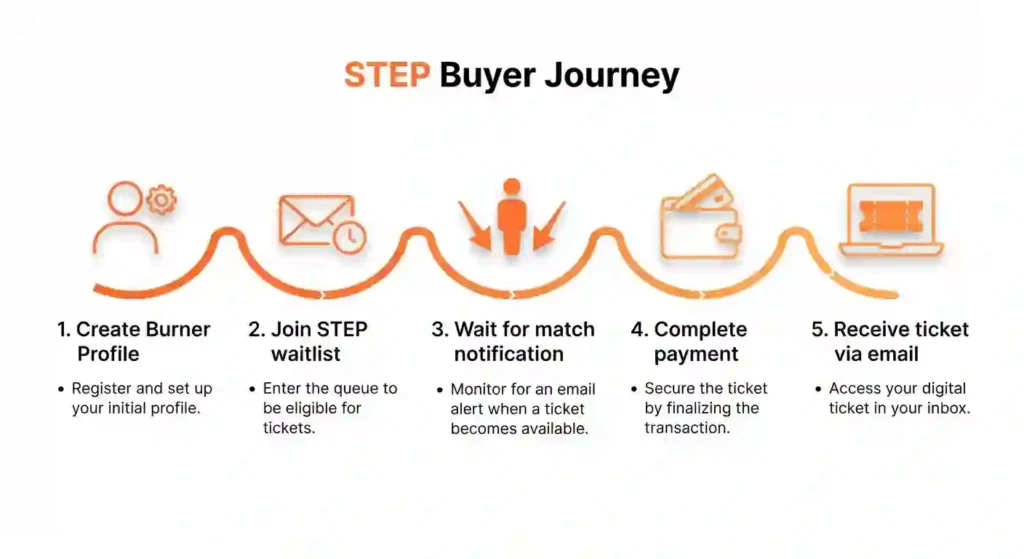
Creating a Burner Profile
Buyers must create and verify a Burner Profile with accurate legal name, email, and phone. Verification (email/phone and any identity prompts) links the profile to the ticketing portal so matched tickets transfer cleanly to the purchaser.
Joining the STEP Waitlist
When reallocation drops occur, buyers monitor the official ticketing portal and any STEP waitlist features. Buyers should keep their profile verified and payment ready—reallocation windows are often short and competitive.
Payment Authorization
Once matched, the buyer receives a conditional purchase prompt and must authorize payment immediately. Use a card that supports 3D Secure/OTP to reduce declines; international buyers should confirm their issuer allows cross‑border authorizations and factor in conversion and bank fees.
Receiving Ticket Confirmation
After successful payment and portal confirmation, the ticket appears in the buyer’s Burner Profile/ticketing dashboard. Save confirmation emails and screenshots. The ticket is now valid for gate entry under the new profile, subject to any vehicle pass or add‑on rules.
STEP Seller Workflow
Listing a Ticket for Sale
Sellers list only through the official ticketing portal, selecting the ticket and confirming intent to resell. Sellers must follow face‑value or pricing rules set by Burning Man and disclose any applicable restrictions (e.g., vehicle pass not included).
Verifying Ticket Ownership
Before listing, ensure the ticket is owned by the correct Burner Profile and that all identity/verification steps are complete so the portal can validate ownership and permit transfer.
Setting Refund Expectations
Sellers should understand and communicate refund conditions (event cancellation, transfer disputes) and follow official guidance on returns. The portal’s refund rules govern timelines and eligibility; sellers should not promise private refunds outside official systems.
H4: Completing the Transfer
When a buyer pays, the portal completes the transfer automatically and notifies both parties. Sellers receive confirmation that ownership has moved; any funds (if applicable) follow the ticketing partner’s payout rules.
How Ticket Matching Happens at STEP
- Queue system: STEP commonly uses an automated queue or waitlist mechanism to sequence buyers during reallocation drops; tickets are processed in batches.
- First‑come, first‑served concepts: while timing matters, some matching can include randomized elements or priority rules—be prepared and logged in ahead of drops.
- Ticket type matching: the system matches like with like (GA to GA, vehicle pass pairing) to ensure buyers receive the correct ticket category.
- Vehicle pass considerations: vehicle passes are often separate items—buyers and sellers must confirm whether a vehicle pass is included or must be purchased separately; STEP will reflect add‑on status during matching.
STEP mechanics at a glance
- Core components: STEP exchange queue, Burner Profile verification, ticketing portal, secure payment rails (3D Secure/OTP).
- Buyer actions: verify profile, monitor reallocation drops, join waitlist, authorize payment, save confirmation.
- Seller actions: list via portal, confirm ownership, set realistic refund expectations, complete automated transfer.
- Matching: automated queue, ticket‑type alignment, vehicle pass handling, and short purchase windows.
- International notes: cross‑border payment readiness, currency conversion, bank holds, and visa timing for purchased tickets.
“A verified profile plus fast, calm execution during a STEP drop turns chance into a reliable route to Black Rock City.”
Who Can Use STEP?
STEP has account and ticket eligibility rules to reduce fraud and ensure smooth transfers. Understanding these requirements ahead of time keeps your sale or purchase from stalling.
Eligibility Requirements
STEP access usually requires a verified event account—meaning your STEP account should match the name and contact info you used to register originally. Organizers require this so gate staff can validate ownership quickly.
Verification steps may include confirmed email, phone number, and sometimes a government ID check for higher‑risk ticket types. Also, not every ticket is eligible for STEP: charity, promotional, or highly restricted allocations may be blocked. Before relying on STEP, log in and review the current eligibility list; it’s the quickest way to avoid wasted effort or surprise rejections.
- Verified Burner Profile: Buyers and sellers must have a Burner Profile with correct legal name, working email, and phone. Verification (email/phone and any identity prompts) links the profile to STEP and is typically required before a transfer can complete.
- Account standing: Profiles with prior misuse or unresolved disputes may be restricted from STEP; keep profile info accurate and resolve support tickets before listing or buying.
- One profile per person: Use a single verified Burner Profile per applicant to avoid duplication flags; camps coordinating block transfers should manage allocations transparently via official camp links and confirmed Burner Profiles.
Buyer Requirements
Buyers must create and verify a STEP account, add a working payment method that accepts pre‑authorizations, and keep contact channels open (email and sometimes SMS). Expect a small temporary authorization to be placed when a match occurs—if your bank flags or declines that hold as suspicious, you can lose the match. Real‑world tip: add both a primary and a backup card to your STEP account, and notify your bank that you’ll be authorizing a payment around certain dates if you’re expecting a match.
Seller Requirements
Sellers need the ticket sitting in their account, a verified STEP profile, and payout setup (bank account or supported processor). STEP may ask sellers to confirm the ticket is transferable and not tied to an ineligible program. Sellers should also be aware of identification checks for payout compliance—depending on payout thresholds, STEP might require tax or identity details. Speed matters: if a ticket is matched to a buyer, sellers often have a limited window to confirm the transfer; slow responses create failed matches and frustrated buyers.
Account and Registration Requirements
A name/email mismatch between your event account and STEP will create friction—fix these in advance. If you moved or changed banks since purchase, update payout and billing info right away. If your account shows prior flags (chargebacks, suspicious activity), clear those with support before listing or joining waitlists—these flags can block participation or remove priority.
Important Participation Rules
STEP enforces face‑value rules and may ban attempts to list tickets above face value. It also typically prohibits circumventing the platform by arranging private side deals for extra fees. Violations can result in account suspension, blocked transfers, and loss of community trust. Keep communication on STEP’s channels and follow their timing rules—those who play by the guide help the system remain viable for everyone.
Accepted ticket types and restrictions (general admission vs special access)
- General Admission (GA): Most STEP transactions involve GA tickets; the system matches GA tickets to GA buyers.
- Special access tickets: Some ticket categories (artist tickets, staff/volunteer, guest passes, certain comp or credentialed tickets) have transfer restrictions or may be non‑transferable; STEP enforces those restrictions and will not allow transfers where prohibited.
- Vehicle passes & add‑ons: Vehicle passes, camping add‑ons, and certain ancillary items may be handled separately—STEP will indicate whether a transfer includes these items or if the buyer must purchase them independently. Buyers should confirm add‑on inclusion before authorizing payment.
Fees, price rules, and face‑value expectations
- Face‑value principle: Burning Man emphasizes face‑value or regulated resale pricing; STEP often enforces or recommends pricing consistent with community fairness to discourage scalping. Sellers should follow price guidance in the portal.
- Platform fees: Depending on the ticketing partner’s policies, small transaction or service fees may apply to STEP transfers; these fees and any payout timing rules are disclosed during listing or at checkout.
- Refund & fee rules: Refund eligibility (event cancellation, buyer disputes) and fee refunds follow the ticketing partner’s policies—sellers and buyers should read terms before completing transactions to understand who bears fees in various scenarios.
- Currency & international fees: International buyers should expect card conversion fees and possible bank holds; STEP shows local charge amounts but buyers must account for exchange rates and cross‑border transaction costs.
STEP fundamentals at a glance
- Core elements: STEP (Secure Ticket Exchange Program), Burner Profile verification, ticketing portal, ticket ID mapping.
- Eligibility: verified Burner Profiles, good account standing, one profile per person, camp-managed transfers require transparent camp records.
- Ticket types: GA (commonly transferable via STEP), special access/credential tickets (may be restricted), vehicle passes and add‑ons (may be separate).
- Timeline: list → queue/hold → buyer match → payment authorization (3D Secure/OTP recommended) → official transfer and confirmation.
- Pricing & fees: face‑value/resale fairness norms, possible platform transaction fees, and international currency/exchange considerations.
“STEP replaces risky back‑channel trades with verified profiles, secure payments, and official transfers protecting both the buyer’s money and the integrity of Black Rock City.”
Download the STEP Fundamentals Checklist
Buying Tickets Through STEP
Buying through STEP is a different mental model from a flash sale—here you prepare, wait, and react quickly to matches. This section walks you through that buyer journey with practical steps.
Why STEP Is the Safest Buying Method
- Official ecosystem: STEP runs inside the Burning Man ticketing portal and is governed by the Burning Man Organization (BMO), so transfers are auditable and recorded against ticket IDs and Burner Profiles.
- Profile‑based ownership: Tickets transferred via STEP are mapped to the buyer’s verified Burner Profile, reducing risks that come with PDF screenshots or off‑portal “proof of purchase.”
- Reduced fraud surface: STEP eliminates many common scam vectors (fake PDFs, social‑media resale scams, and untraceable wire/crypto payments) by requiring authenticated portal flows and tracked payment events.
Official Payment Processing Protection
- Secure rails: Payments on STEP are processed through the ticketing partner’s official payment gateway which supports standard protections—encryption, PCI compliance, and transaction logging.
- 3D Secure/OTP: Buyers are strongly advised to use cards that support 3D Secure (Verified by Visa, Mastercard SecureCode) and be ready to approve OTPs; these protections reduce chargeback and fraud risk and lower payment declines.
- Backup cards & bank auth: Add a verified backup card where the portal allows it and, if international, notify your bank in advance to expect cross‑border authorizations to avoid holds during short payment windows.
- Fee transparency: STEP shows any platform or service fees at checkout; international buyers should also factor in currency conversion spreads and bank transaction fees.
Joining the Waitlist
When you join a STEP waitlist, be explicit about the ticket type and any bundle needs (ticket + vehicle pass). If STEP lets you specify acceptable alternates, include those—flexibility raises your odds. Note the exact timestamp when you join; it matters in queues and helps you estimate relative progress. Also, set your expectations: it often helps to join multiple related waitlists (if allowed) to broaden matching opportunities without creating record-keeping confusion.
Understanding Queue Priority
Priority often follows join order, but STEP may use secondary rules (regional allocations, ticket attributes, or verified buyer status). Don’t rely on quirky forum advice—check STEP’s published rules for that season. Keep your account in good standing; sometimes prior attendance history or verified payment history can improve matching reliability. If you see unusual prioritization, ask STEP support for clarification—platforms usually document matching rules somewhere.
Waiting for Ticket Availability
Waiting is where many buyers get anxious. Rather than refreshing endlessly, use this time to finalize refundable or changeable travel options and firm up camp backup plans. Set a realistic personal deadline—if you don’t get a match by X days before travel, trigger your fallback plan (steward sign-up, FOMO budget, or camp standby). This prevents the last-minute scramble and poor decisions that can cost you more.
How Ticket Verification Works
- Portal validation: STEP validates a ticket’s eligibility for resale (ticket type, add‑ons, transfer restrictions) before allowing a listing to proceed. Ineligible tickets (many LITP allocations, artist/staff credentials) are usually blocked.
- Ownership confirmation: Prior to transfer, the portal confirms the seller’s ownership and the buyer’s verified profile—this prevents transfers from non‑owners or accounts with mismatched identity data.
- Gate mapping: After a successful STEP transfer the ticket ID is associated with the buyer’s Burner Profile in the ticketing database so gate staff can validate entry by scanning the official record, not a standalone PDF.
Email Confirmation & Burner Profile Tracking
- Immediate receipts: After payment clears, buyers receive an official email receipt and a portal notification confirming the transfer; these are the authoritative records—save them.
- Dashboard updates: The buyer’s Burner Profile / ticketing dashboard will display the new ticket and any attached add‑ons (vehicle pass, camping add‑ons) when the transfer completes.
- Save evidence: Keep screenshots of confirmation pages, email receipts, and the ticketing dashboard state in case you need to open a dispute or show proof to camp members. Don’t rely on third‑party messages that are not mirrored in the official portal.
Payment Authorization Process
When STEP matches you to a ticket, the system places a pre-authorization hold to confirm your funds before completing the transfer. Know your card’s authorization rules—some banks drop authorizations after a short time or treat them as fraud. If your card fails, STEP will notify you and often pass the match to the next buyer. To avoid this, use stable bank accounts with higher limits or add backup cards to your account, and temporarily disable fraud alerts that could block legitimate STEP holds.
Receiving Your Tickets
After the transfer clears, verify that the ticket appears in your STEP profile and that confirmation emails arrive. Check the ticket details: date, access type, and any linked vehicle passes. If something looks off (name mismatch, wrong ticket tier), contact STEP support immediately and preserve screenshots of the dashboard and emails—these speed resolution at the gate. Also, tell your camp lead that you’ve secured tickets so they can update rosters and logistics.
What Happens After Successful Purchase? (digital handling, shipping, account updates)
- Digital ticket handling: Most STEP transfers immediately reflect in the buyer’s ticketing dashboard; the event entry is tied to the buyer’s verified profile and gate access is granted via the official ticket database.
- Vehicle pass & add‑ons: If a vehicle pass or add‑on was included, the portal will indicate their transfer status; if not included, purchase the necessary pass separately during its sales window. Confirm vehicle pass mapping before relying on shared vehicle access.
- Shipping timelines (if physical or mailed items exist): Some ticket types or physical credentials (rare) may have separate mailing timelines—check portal notes. Generally, digital ownership is sufficient for gate entry if mapped to your Burner Profile.
- Account coordination: Update camp rosters and travel plans with ticket confirmations and ensure each traveling person has a verified Burner Profile where required. For international buyers, finalize visa plans and flight bookings only after payment clears and you have documentation of ticket ownership.
- Dispute & refund path: If the purchase fails or fraud is suspected, open an official helpdesk ticket immediately, include confirmation screenshots and transaction IDs, and follow the ticketing partner’s dispute process; keep bank and card statements handy for chargeback evidence if needed.
- Join specific waitlists and include acceptable alternates if allowed.
- Understand matching rules; check STEP’s published priority rules.
- Use wait time to firm refundable travel and backups.
- Keep multiple, verified payment methods ready; save confirmation records.
- Verify Burner Profile: name, email, phone, and ID match your government ID.
- Payment readiness: primary & backup 3D Secure/OTP‑capable cards, notify bank for cross‑border authorizations if international.
- Portal checks: confirm ticket type (GA vs restricted), vehicle pass inclusion, and any add‑on status before payment.
- Save confirmations: email receipt, dashboard screenshot, and portal transfer ID.
- Post‑purchase: confirm vehicle pass mapping, update camp contacts, finalize visa/travel only after ownership is confirmed, and open a helpdesk ticket immediately on issues.
“Buying through STEP shifts trust from strangers’ screenshots to verified profiles and secure transfers—protect your money and your trip by staying inside the official portal.”
Download the STEP Buyer Safety Checklist
Selling Tickets Through STEP
People list tickets on STEP for many sound reasons—unexpected financial strain, illness, schedule conflicts, or changing travel plans. STEP gives sellers a secure, portal‑based path to return tickets to the community while preserving fairness and reducing fraud. The following section explains why burners sell, a clear seller workflow, buyer selection rules, and refund timing so sellers (U.S. and international) know what to expect.
Reasons Burners Sell Tickets
- Financial issues: sudden loss of income, emergency expenses, or unexpected bills.
- Health problems: personal illness or a dependent’s medical needs that prevent travel.
- Schedule conflicts: work, family obligations, or academic obligations that unexpectedly overlap the event.
- International travel problems: visa denials, flight cancellations, or prohibitive travel costs that make attendance impossible.
Selling via STEP gives you a safe channel to return tickets, reduces the risk of fraud, and helps community members find seats post-sale. Here’s how to list and manage a sale responsibly.
Listing Your Tickets
List only tickets you control and can transfer. When you list, describe exactly what’s included (seat, vehicle pass, bundle) and any restrictions. Sellers who overpromise or mislabel bundles cause buyer frustration and platform strain. If your ticket was part of a directed group or special allocation, verify transfer permissions—some allocations require lead approval or are non-transferable.
- Verify ownership and profile: confirm the ticket is in the seller’s Burner Profile and that the profile is fully verified (legal name, email, phone, any ID verification).
- Use the official portal: list only through the ticketing portal linked from burningman.org; do not attempt private transfers or off‑portal listings.
- Select the correct ticket and add‑ons: choose the exact ticket ID to list and indicate whether a vehicle pass or camping add‑on transfers with it. Be explicit about what the buyer will receive.
- Follow the portal prompts: enter listing details, accept any terms (pricing rules, fees), and submit; the portal validates eligibility (some ticket categories may be blocked).
- Keep records: save the listing confirmation and screenshots of the portal state; these help resolve disputes or questions about listing status.
Pricing guidance and face‑value rules
- Follow face‑value norms: Burning Man and community norms discourage scalping; STEP typically enforces or strongly encourages resale at or near face value. Sellers should consult the portal’s pricing rules and avoid inflated listings that invite disputes or sanctions.
- Disclose fees: list prices should account for any platform fees and expected transaction costs; the portal will usually show buyer‑facing fees at checkout. Sellers receiving payouts should understand net amounts and payout timing per the ticketing partner.
- Be transparent: if a vehicle pass or camping add‑on is not included, state that clearly. Transparency prevents buyer disputes and speeds transfer completion.
Timing: when to list for best results (reallocation waves, OMG/Last Chance)
- Post‑sale waves: returned tickets commonly reappear after major sales—Community Sale, OMG, and Last Chance windows are high‑visibility times for STEP activity. Listing shortly before or during known reallocation windows increases buyer demand.
- Time of day & batch drops: some waves are time‑bound; check official announcements and regional burn group chatter for likely drops. Be ready with listing details and confirmations before expected waves.
- Camp coordination: if selling as a camp lead or block holder, coordinate internal transfers before open STEP listings to reduce uncertainty and ensure members have verified Burner Profiles ready.
What to do if the buyer doesn’t complete payment
- Portal requeue: if a matched buyer fails to complete payment within the hold window (authorization timeout, card decline), the portal typically requeues the ticket for the next buyer or returns it to active listings—monitor the listing status in your Seller Dashboard.
- Communicate via portal only: do not pursue private payment channels; keep all communication inside the official system to preserve proof and avoid scams.
- Relist politely: if a sale falls through, relist promptly and consider adjusting timing to hit the next reallocation wave. Keep screenshots of failed transactions or authorization attempts if you need to report issues to support.
Handling refunds and returns (seller responsibilities)
- Understand official refund policies: refunds or returns are handled per the ticketing partner’s rules—read the terms at listing time. Common causes for refunds include event cancellation, proven fraud, or ticket ineligibility.
- Do not promise private refunds: avoid arranging refunds directly with buyers outside the portal; off‑portal refunds void official protections and can lead to disputes or profile sanctions.
- Document everything: if a buyer requests a refund or opens a dispute, gather screenshots (listing confirmation, payment receipt, ticket ID), correspondence (portal messages), and any evidence the ticket was listed correctly. Provide these to the helpdesk when requested.
- Payout timing & disputes: sellers should note that payout schedules may be delayed pending dispute resolution; check the ticketing partner’s payout policy and maintain access to the email tied to your Burner Profile for notices.
Setting Up Your Account
Before listing, verify payout details, tax information, and identity verification in your STEP seller settings. Platforms often delay payouts until account verification completes; having this ready speeds your exit. Sellers should also keep records of the original purchase and any communications in case STEP requests verification—faster verification equals fewer delayed matches.
Step‑by‑step Burner Profile setup
- Create account: register at the official Burning Man site using a stable, personal email address (avoid shared or temporary emails).
- Enter legal details: provide your full legal name exactly as it appears on government ID, a reliable phone number, and current mailing address.
- Complete profile fields: add emergency contact, regional affiliation (if any), and any camp or organizational ties you have.
- Link to ticketing: follow the portal prompts to connect the Burner Profile to the official ticketing system so STEP transfers can associate with your account.
- Verify contact points: confirm email via the verification link and complete SMS/phone verification if prompted.
Identity verification and linking to ticketing account
- ID prompts: follow any identity verification steps (upload driver’s license or passport) exactly as requested; use high‑quality scans or PDFs.
- Photo ID tips: present the same name and DOB that match your profile; if your ID shows an old address, supply a current utility bill or lease for residency proof.
- Ticketing link: ensure the Burner Profile email matches the ticketing account email or explicitly link both accounts in the ticketing portal to avoid transfer mismatches.
- Third‑party verification: some verification flows use ticketing partners or identity vendors; follow their instructions and keep screenshots of successful verification pages.
Troubleshooting verification problems
- Mismatched names/addresses: correct your Burner Profile to exactly match your ID before re‑submitting verification; don’t alter documents to fit the profile.
- Rejected uploads: if the portal rejects a scan, rescan at 300 DPI or use a trusted phone‑scan app (ensure full page, no glare) and submit a PDF.
- Verification delays: if verification stalls, check spam folders for messages, wait the portal’s stated processing time, then open an official helpdesk ticket including your Burner Profile ID and screenshots.
- Locked or flagged accounts: if flagged for review, don’t create a new profile—contact the official helpdesk with your profile ID and a calm explanation; duplicate profiles can complicate STEP eligibility.
Best practices for profile security (passwords, 2FA)
- Strong passwords: use a unique, strong password for your Burner Profile and avoid password reuse across sites.
- Two‑factor authentication: enable 2FA if available on the account and protect the linked email account with 2FA as well.
- Secure email: use an email provider with robust security features and enable login alerts so you detect unauthorized access quickly.
- Device safety: perform uploads and profile actions from a secure device and network—avoid public Wi‑Fi for payment or identity steps.
- Keep records: save screenshots of verification confirmations and any helpdesk ticket numbers in a secure folder for quick reference during STEP transfers.
When Tickets Become Available
Don’t assume immediate sale—supply and demand fluctuate. High-demand tickets may sell fast; niche tickets can take time. Keep notifications active and respond quickly to STEP prompts to finalize transfers; buyers expect fast confirmations. If you need to delay a transfer (for personal reasons), communicate via STEP support so the platform can requeue or pause the listing.
Receiving Payment
STEP payouts vary some platforms disburse quickly after transfer, others hold funds for clearing. Know the timing and check for any fees deducted; sellers should confirm post-transfer deposits and reconcile them against platform records. If a payout is delayed, contact STEP support and provide transfer confirmations and account details—having screenshots speeds troubleshooting.
Completing the Sale Successfully
Follow platform prompts, confirm transfers immediately, and keep polite, clear communication if questions arise. Sellers who respond slowly harm buyer trust and may face penalties. After transfer, archive all STEP confirmations and payout receipts for accounting or reimbursement purposes.
- List only transferable tickets and clearly describe bundles.
- Verify payout and ID details before listing to avoid delays.
- Respond promptly to STEP notifications to finalize matches.
- Save confirmations and reconcile payouts after transfer.
- Core items: official Burning Man site (burningman.org), Burner Profile, ticketing portal link, verified email and phone, government ID (driver’s license/passport), proof of residency (lease/utility).
- Actions: exact legal name matching, high‑quality ID scans (PDF), link profile to ticketing account, enable 2FA, keep backup contact and payment ready.
- Troubleshooting: rescan at 300 DPI, check spam, open helpdesk ticket with profile ID, avoid creating duplicate profiles.
“A clean, verified Burner Profile removes friction during STEP drops—get the profile right now so you can move fast when tickets appear.”
Download the Burner Profile Setup Checklist
What Types of Tickets Can Be Exchanged?
Not all tickets are created equal when it comes to exchangeability. Know what STEP supports so you don’t plan around an unavailable option.
Eligible Ticket Types
STEP usually supports mainstream ticket types—standard general admission and many vehicle pass categories—as well as typical add-ons, with eligibility lists published each season. If your ticket is a standard, transferable ticket, STEP will likely accept it; however, always check the current eligible ticket list. If in doubt, log into STEP and run a mock-list flow to see if your ticket type is accepted.
Standard Admission Tickets
Standard General Admission (GA) tickets are the most commonly transferred items on STEP. These are typically eligible for official resale and reallocation, matched to verified Burner Profiles and moved through the ticketing portal once payment clears. Buyers should confirm ticket type (GA vs. any restricted subcategory) and any included add‑ons before authorizing payment. Sellers listing GA tickets should follow face‑value guidance and disclose whether vehicle passes or camp add‑ons are included.
Low Income Ticket Restrictions
Low Income Ticket Program (LITP) allocations frequently carry stricter transfer rules. In many cycles, low‑income tickets are non‑transferable or subject to very limited transfer conditions to protect program integrity and ensure that the intended recipient uses the allocation. Sellers who attempt to list LITP tickets may find those tickets blocked from STEP, or they may only be transferable under specific, documented circumstances defined by the Burning Man Organization (BMO). Applicants and winners should confirm transferability in their approval notice and avoid informal resale attempts—doing so risks profile sanctions.
Tickets That Cannot Be Listed
Charity, promotional, or certain sponsored tickets and tightly controlled allocations (some directed group blocks or artist-specific passes) may be excluded. These are usually non-transferable by design. If you hold one of these, contact the program admin—sometimes they offer internal transfer or substitution mechanisms, but these are not STEP exchanges.
VIP or Special Ticket Considerations
Special ticket categories—artist tickets, staff/crew credentials, guest or invitation‑only allocations, institutional allocations, and certain directed tickets—often carry explicit non‑transferable clauses or require organizer approval to move. STEP enforces these restrictions: such tickets may be ineligible for resale or may require additional verification and approvals. Camps managing block allocations, artist teams, or directed guest lists should consult official policies before attempting transfers and use STEP only where the ticketing portal permits.
Vehicle Pass Exchange Rules
Vehicle passes often have extra rules: they may require proof of vehicle registration or be non-transferable near entrance dates. Bundled ticket+ vehicle transfers can be restricted to simultaneous matches. If you plan to exchange a vehicle pass, confirm the pass type’s STEP eligibility and whether the system supports bundled matching for vehicles plus admission.
Bundled Purchases
Bundles (tickets with vehicle passes or add-ons) complicate matching: buyers need to request the full bundle, and sellers must list it precisely. If STEP allows partial matches, you might need to split bundles or relist components separately. Mislabeling bundles is a top cause of failed matches—describe items precisely and check the platform’s bundle handling rules.
Exchange Limitations
Exchanges can be limited by timing, type restrictions, or verification complexity. Popular items like basic tickets move quickly; rarer combinations or specialty passes may lack demand. If you rely on STEP as backup, diversify your approach—pair STEP with camp standby or stewarding to avoid being stuck.
- STEP accepts many standard tickets and many vehicle passes; verify current lists.
- Charity/promotional or some directed block tickets can be non-exchangeable.
- Bundles need precise listing and buyer requests; mislabeling causes failed matches.
- Use STEP plus backup plans for rare or restricted ticket types.
- Commonly transferable: General Admission (GA) tickets via STEP.
- Restricted: Low Income Ticket Program (LITP) allocations often non‑transferable or tightly controlled.
- Vehicle passes: May transfer separately; confirm inclusion and class before purchase.
- Special tickets: Artist/staff/guest/directed tickets usually restricted or non‑transferable; require BMO rules compliance.
- Action items: check ticket type in the portal, verify Burner Profile status, confirm add‑on inclusion (vehicle pass, camp block), and follow official STEP listing rules.
“Know the ticket type before you click buy—STEP protects transfers, but some allocations aren’t meant to change hands.”
Download the STEP Ticket Type Checklist
STEP Fees, Payments, and Refunds
STEP’s refund paths protect buyers and sellers while keeping transactions inside the official ticketing system. This section explains how refunds are handled for STEP sales, what fees or deductions to expect, realistic timelines, what happens if a ticket never sells, and common problems that delay payouts—useful for U.S. and international sellers and camp leads.
STEP involves fees and payout mechanics—know what buyers and sellers pay, how payments process, and refund rules so there are no financial surprises.
How Refunds Work for Sellers
- Transfer completion first: sellers only receive a payout after STEP confirms a successful transfer and the buyer’s payment clears. The ticketing portal records the transfer and initiates the payout process per the platform’s payout rules.
- Refunds vs. payouts: a payout is money sent to a seller after a successful sale; a refund is money given back to a buyer when a sale is reversed (event cancellation, proven fraud, payment dispute). Sellers may be asked to assist with evidence during dispute investigations.
- Platform mediation: official disputes go through the ticketing partner and Burning Man helpdesk; do not agree to private refunds outside the portal—those void protections and can lead to penalties.
Processing Fees & Possible Deductions
- Platform/service fees: some ticketing partners apply a small service or processing fee on STEP transactions; the portal should display fees at listing or checkout and show the net seller payout.
- Chargebacks & dispute costs: if a buyer successfully disputes a charge with their bank, chargeback fees or returned funds may affect the seller’s net payout and delay final settlement while the dispute is investigated.
- Currency conversion & bank fees: international sellers should note that receiving funds across borders can incur conversion spreads and receiving bank fees; those are typically outside the ticketing portal’s control and reduce net amounts.
Refund Timeline Expectations
- Post‑transfer processing: after a confirmed transfer, platforms commonly initiate payouts within a specified window (for example, several business days); exact timing depends on the ticketing partner’s payout schedule.
- Bank posting time: once the platform issues a payout, bank processing times vary—domestic transfers often post within 1–5 business days; cross‑border transfers can take longer (up to 10 business days or more depending on banks and routes).
- Delays for disputes: if a buyer opens a dispute or fraud claim, payouts may be held until the investigation concludes—this can extend timelines by weeks. Keep portal confirmation IDs and correspondence handy to speed resolution.
What Happens If a Ticket Does Not Sell?
- Relisting & requeue: unsold tickets typically remain in the STEP pool or are returned to active listings; sellers can relist or adjust timing to hit different reallocation waves (Community Sale, OMG/Last Chance).
- Withdraw options: some portals allow sellers to withdraw the listing and retain the ticket for use or private transfer only if policy permits; check the portal’s rules before attempting private sales.
- No sale = no payout: if a ticket never sells via STEP, there is no seller payout. Sellers keep ownership and must plan next steps—relist, coordinate camp transfer (if eligible), or keep the ticket.
Common Refund Problems (and how to avoid them)
- Expired or invalid payment methods: buyers’ cards that expire or are blocked can lead to failed payments and requeues. Sellers should encourage buyers to confirm cards before matching, and sellers should keep an eye on portal hold messages.
- Bank delays and intermediary holds: international payouts can be slowed by intermediary banks or compliance checks; sellers should account for extra processing time and consult their bank for incoming payment timelines.
- Incorrect account or payout info: ensure the email and any required payout account details tied to the Burner Profile are current; mismatches can delay or misdirect payouts—update profile/payment settings before listing.
- Chargebacks and disputes: chargebacks initiated by buyers can reverse cleared payments; sellers should keep full documentation (listing screenshots, transfer receipts) and respond promptly to helpdesk requests to defend the sale.
- Missing documentation in disputes: when a dispute arises, portals ask for clear evidence—listing screenshots, transfer confirmation, buyer communication, and ticket IDs. Prepare these proactively and store them securely.
Buyer Processing Fees
Buyers typically pay a processing fee on top of face value—this covers payment processing and platform operation. Fees can be percentage-based or flat and may vary by item (vehicle passes sometimes carry different fees). Account for these when comparing STEP to private alternatives; the fee buys legitimacy and support rather than a discount.
Seller Fees
Sellers can expect a small fee or percentage to be deducted from payouts—this varies by platform. That fee funds transaction processing and platform operations. Sellers should calculate net payout (face value minus fees) vs. alternatives (holding for another sale or private transfer) to decide if STEP fits their timeline and financial needs.
Payment Methods
STEP commonly accepts major credit/debit cards for buyers and routes seller payouts via bank transfer or supported processors. Ensure your bank or card supports holds and has sufficient limits. For international participants, check currency conversion fees and payout country support—some payout methods don’t work in every country.
Refund Policy
Refunds depend on where in the process a problem occurs. If a match fails before capture, the authorization usually drops; if a transfer fails post-capture, STEP’s policies determine next steps (refund, requeue, or support resolution). Keep all communication and confirmation receipts; these speed refunds and dispute resolution if needed.
Financial Considerations
Consider extra costs for international bank fees, holding periods, and payout delays. Factor fees into the decision to sell now vs. later, especially if you can predict demand. For buyers, compare final cost (face value + fees) with alternative options—but weigh safety and risk when deciding between STEP and private channels.
- Buyers pay processing fees; sellers incur listing/payout fees—check exact schedules.
- Verify payment and payout methods, especially for international users.
- Refund rules vary—keep transaction records to speed disputes.
- Factor net payout and final buyer cost into listing and buying decisions.
- Confirm: you listed via the official ticketing portal (burningman.org) and the ticket transferred to a verified Burner Profile.
- Expect: platform/service fees, possible chargeback costs, and bank conversion/receiving fees for international payouts.
- Timeline: platform payout window (days), bank posting (1–10+ business days), longer delays if disputes occur.
- If unsold: relist for reallocation waves (Community Sale, OMG, Last Chance) or retain ticket per portal rules.
- Prevent delays: keep payout/contact info current, save screenshots/transfer IDs, use documented portal communication, and avoid off‑portal refunds.
“Treat STEP payouts like any official payment: verify your details, save proof, and expect processing time—disputes and international banking are the usual causes of delay.”
Download the STEP Refund & Payout Checklist
Transfer Rules and Restrictions — STEP Ticket Transfers
STEP transfers tie tickets to verified Burner Profiles and enforce rules so tickets move fairly and securely. This section explains who may transfer, common limits and timeframes, family and camp transfer scenarios, and how vehicle passes and add‑ons are handled—useful for U.S. residents and international attendees alike.
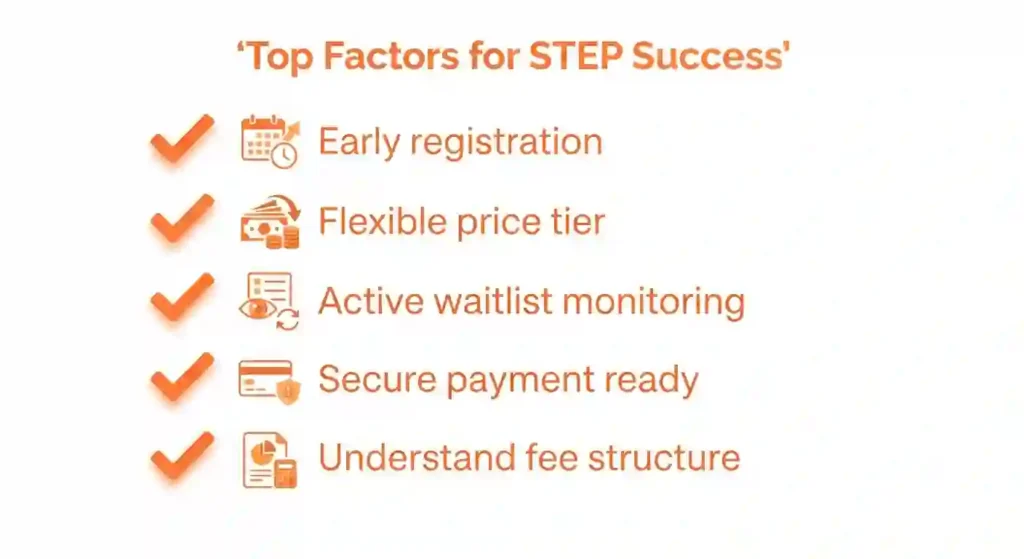
Who can transfer a ticket (profile matching, identity rules)
- Verified Burner Profile required: only the Burner Profile that legally owns the ticket and is fully verified (name, email, phone, any ID checks) can initiate a STEP transfer.
- Profile matching: the portal matches ticket ownership to the seller’s profile and maps the ticket to the buyer’s verified profile on completion; names and DOB should match submitted ID where required.
- Account standing matters: profiles with unresolved disputes, prior misuse, or sanctions may be blocked from transferring or receiving tickets. Keep account issues resolved before attempting transfers.
- One person, one profile: use a single verified Burner Profile per person; duplicate profiles create confusion and can invalidate transfers.
Limits on transfers (quantity, timeframes, non‑transferable categories)
- Quantity limits: ticketing policy may limit how many tickets one profile can buy or sell in a cycle—these limits prevent bulk scalping and preserve equity. Check the portal for current per‑profile limits.
- Timeframes and payment windows: STEP matches and places short payment holds; buyers must authorize payment quickly (often within minutes to a few hours). Sellers should be prepared for requeue if a buyer fails to pay.
- Non‑transferable categories: certain ticket types are often non‑transferable or require special approvals—examples include many Low Income Ticket Program (LITP) allocations, artist/staff/crew credentials, directed or invitation‑only tickets, and some comp tickets. The portal enforces these restrictions and will block ineligible listings.
- Transfer blackout periods: some administrative periods (close to event dates or during specific sales windows) may restrict transfers; check official communications for any temporary rules.
Family/camp transfer scenarios and best practices
- Family transfers: each adult should have their own verified Burner Profile; for minors or dependents, follow event rules (some tickets for dependents may require the guardian to manage logistics). Provide dependent proof (school letter, birth certificate) when needed for household assessments in other programs.
- Camp block transfers: camps often hold block allocations and must coordinate transfers to new members using verified profiles. Pre‑register incoming members’ Burner Profiles and confirm identity verification ahead of any block transfer window.
- Written agreements: document any financial arrangements (who pays whom) in writing—portal messages or simple signed emails are helpful evidence in disputes. Avoid private cash or off‑portal promises that contradict STEP rules.
- Role‑based transfers: if a ticket is tied to a specific role (artist, medic, volunteer), confirm whether the ticket is transferable or if organizer approval is required; some role tickets are non‑transferable to preserve program integrity.
What happens to vehicle passes and add‑ons in transfers
- Separate items: vehicle passes and certain add‑ons (reserved camping, RV passes) are frequently separate line items and may not automatically transfer with the main ticket. The STEP listing will indicate inclusion; never assume a vehicle pass is included unless explicitly stated.
- Matching vehicle pass type: if a vehicle pass is transferable, STEP will attempt to match by pass class (car, RV, motorcycle) and enforce any size or credential constraints. Buyers should confirm vehicle class and pass mapping before payment.
- Shared vehicle planning: camps sharing vehicles should coordinate who holds the vehicle pass; transferring the vehicle pass to the primary driver’s verified Burner Profile avoids gate confusion.
- Add‑on timing: some add‑ons have separate sales windows; if an add‑on doesn’t transfer, purchase deadlines and availability may differ—plan accordingly to secure necessary passes or camping upgrades.
Transfer Essentials
- Core elements: STEP, Burner Profile verification, ticketing portal, ticket ID mapping, transfer holds, 3D Secure/OTP payment readiness.
- Transfer rules: verify profile standing, respect per‑profile quantity limits, and note non‑transferable ticket categories (LITP, artist/staff credentials).
- Family & camp: each traveler should have a verified profile; camps should pre‑verify members and document block transfer arrangements.
- Vehicle/add‑ons: confirm inclusion in the STEP listing, check pass class matching, and coordinate who holds vehicle passes for gate access.
“Treat transfers like legal handoffs: verified profiles, clear listing metadata, and documented camp agreements keep tickets moving cleanly and protect everyone’s access to Black Rock City.”
Download the STEP Transfer Rules Checklist
What Affects Your Chances of Getting Tickets?
STEP success is partly luck supply and timing matter—but you can influence several variables. This section explains what moves the odds in your favor.
Ticket Availability
The most important variable is supply: more cancellations and returns mean more STEP inventory. In some seasons, large numbers of returns ahead of travel windows flood STEP with options; in others, few returns create scarcity. Monitor community chatter and organizer notices—planned cancellation windows (refund periods) can temporarily spike supply.
Timing of Your Waitlist Registration
Earlier registration on a waitlist generally improves probability of matching. If you know you’ll need STEP as a fallback, sign up early for relevant categories rather than waiting until after other options fail. Think of it like airline standby: early signups fill from top down.
Popular Ticket Types
General admission and small vehicle passes see highest demand and fastest turnover. Specialized tickets (oversized rigs, rare add-ons) are less liquid. If you’re flexible, expand the types you’ll accept to raise your chance of a match.
Seasonal Demand
Expect STEP activity to spike around main sale closes, visa booking deadlines, and pre-event travel windows. If you can be patient through these peaks, you’ll often see useful listings as plans change. Conversely, avoid panic around these peaks prices and demand fluctuate and patience can win you a face-value match.
Managing Expectations
STEP is reliable but not guaranteed. Don’t book nonrefundable travel before you hold confirmed tickets. Set realistic timelines and backup plans, and remember that many successful attendees combine STEP with camp standby lists, stewarding, or a small FOMO budget.
- Supply and timing are the main drivers of STEP success.
- Join waitlists early and broaden acceptable ticket types where possible.
- Expect demand spikes around key calendar events; stay patient and flexible.
- Use STEP as part of a layered backup plan—don’t rely solely on it.
STEP vs Buying From Other Sources
Compare STEP with common alternatives so you can choose the safest way to exchange tickets.
STEP vs Private Sales
Private sales depend on personal trust and risk the highest fraud or duplicate-ticket issues; STEP verifies transfers and records ownership, reducing gate denials. Private sales can be quicker and avoid platform fees, but they place the buyer at risk of being left with invalid tickets and no recourse. If you must buy privately, use escrow services or ask the seller to transfer via STEP when possible.
STEP vs Social Media
Social media marketplaces are noisy and unregulated—plenty of scams exist. STEP removes that uncertainty by documenting transfers. Social buyers sometimes get bargains, but discounted tickets from strangers often turn out to be fraudulent or revoked. If you encounter an offer on social media, insist on an on‑platform STEP transfer to secure the deal.
STEP vs Ticket Resellers
Resellers can offer speed but at a cost—marked-up prices and a higher likelihood of non‑official fulfillment. STEP preserves face‑value norms and community fairness; resellers operate outside that ethos and may deliver invalid tickets or charge hefty fees. If you choose a reseller, verify their reputation rigorously and accept the financial and legitimacy risk.
Why Official Exchanges Are Safer
Official exchanges authenticate ownership, document transfers, and provide support if problems arise the combination reduces gate denials and fraud. STEP’s logged transfer trail helps both parties if disputes occur. For community health, official channels keep tickets circulating without opening the door to profiteering or scams.
Choosing the Best Option
Prefer STEP whenever possible. Use private sales only with known, trusted partners and consider escrow; avoid social media and resellers unless you accept the inherent risk. If speed is essential, weigh whether increased cost or risk is worth the certainty—often the safer community-minded choice is to use STEP and be patient.
- STEP is safer and more transparent than private sales, social posts, or resellers.
- Private or reseller options can be faster but carry higher fraud and invalidation risk.
- Use STEP whenever possible; use private deals only with trusted partners.
STEP for International Buyers & Sellers
International buyers and sellers can use STEP, but cross‑border realities add friction: currency conversion, bank holds, visa timing, and logistics for shipping art or large gear. This section gives practical steps and checks so non‑U.S. participants handle payments, transfers, and post‑purchase planning with fewer surprises.
Cross‑border payment issues and currency conversion
- Expect holds and pre‑auth declines: many banks flag or block unusual cross‑border authorization attempts; notify your bank before STEP windows when possible.
- Use 3D Secure/OTP‑capable cards: cards that support OTP reduce friction and chargeback risk; add a verified backup card to your Burner Profile.
- Show amounts clearly: STEP will display a charge in the portal’s currency; for your records, capture a dated screenshot of the USD amount and your bank’s converted charge so you can reconcile fees.
- Account for conversion spreads: card issuers and payment processors add exchange spreads beyond published mid‑market rates; factor an extra 2–4% (or check with your bank for exact fees).
- Consider local card partners: if you have a U.S. card or a multi‑currency card (some fintech providers), those often reduce conversion fees and authorization problems.
Visa and travel timing considerations for purchased tickets
- Don’t book irreversible travel before ownership is confirmed: wait until STEP transfer and payment fully clear before purchasing non‑refundable flights or committing to visa appointments that depend on a tight timeline.
- Start visa process early: conditional approvals or STEP purchase windows can be short; research U.S. visitor visa appointment availability in your country and gather supporting proof (ticket confirmation, camp contact letter) quickly if required.
- Document timelines for consulates: some visa offices accept evidence of ticket purchase or pending purchase; keep STEP confirmations and Helpdesk ticket numbers handy to show intent and timing.
- Allow buffer days: plan extra travel days for delays and customs processing (for art/shipping) and to join your camp before event start.
Shipping art/gear and transfer logistics for international attendees
- Prefer U.S. rentals or camp‑shared gear for bulky items: shipping large art, generators, or shade structures internationally is expensive and faces customs delays—rent or borrow from U.S. suppliers or camps when possible.
- Document sponsorships and logistics: if a camp ships gear or sponsors your art, include written confirmations in your STEP or travel planning packet so reviewers and customs officials see organized support.
- Customs and permits: research temporary import rules, duties, carnet requirements, or permits for art and technical equipment; allow lead time for paperwork and possible inspection.
- Consolidate shipments: if shipping is necessary, consolidate shipments through a U.S. hub or work with a shipping forwarder experienced in festival logistics to reduce per‑item costs and customs complexity.
Bank fees, exchange rates, and contingency planning
- Build fee buffers into your budget: include expected currency conversion, cross‑border fees, and possible international ATM or bank receiving fees in your trip cost.
- Keep a backup payment method: have at least two cards (different issuers) and, when possible, a U.S.‑issued card held by a trusted camp mate as a last‑resort backup (only use through official portal flows—do not share OTPs).
- Track conversion proof: save dated screenshots of exchange rates used during payment and keep bank statements showing the actual posted charge for later disputes.
- Emergency funds: maintain a small contingency for authorizations that fail (temporary holds), unexpected refunds, or last‑minute travel changes—especially important when banks take extra days to resolve cross‑border issues.
International STEP checklist
- Payment: 3D Secure/OTP card(s), backup card, notify bank for cross‑border auth, expect conversion spreads.
- Currency: save dated USD conversion screenshots (XE/Google/OANDA) and reconcile posted bank charges.
- Visa & travel: delay irreversible bookings until transfer confirmed, start visa steps early, carry STEP confirmations for consulates.
- Gear & shipping: prefer U.S. rentals/shared camp equipment, research customs/carnet rules, use experienced forwarders.
- Contingency: budget for bank fees, conversion spreads and emergency funds; keep helpdesk ticket numbers and transaction IDs.
“International STEP users win by preparing for banking friction and logistics—verify cards, document conversions, and plan travel only after ownership is official.”
Download the International STEP Checklist
Common First-Timer STEP Mistakes
Avoid these frequent missteps—many are preventable with simple preparation.
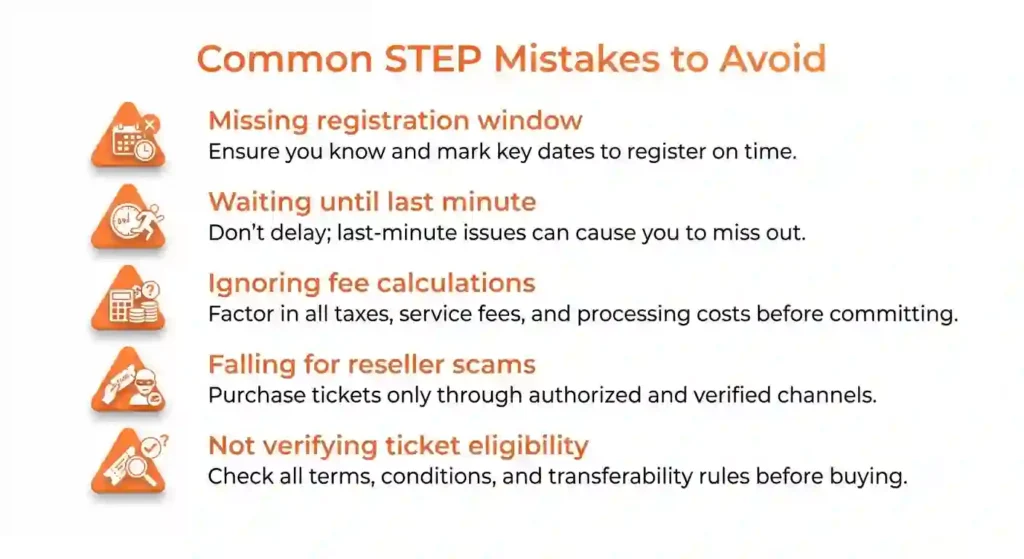
Waiting Too Long to Join
New users often wait until the last minute to join a waitlist, then panic. Joining early raises your odds; don’t wait for everything else to fail before signing up. If you plan for STEP as a fallback, include it in your plan early.
Misunderstanding Waitlist Expectations
Buyers sometimes expect instant matches; STEP is probabilistic. Matches can take hours, days, or weeks depending on supply. Don’t treat a lack of immediate match as a failure; instead, run your fallback timeline and stay patient.
Ignoring Official Emails
STEP uses email for time‑sensitive match notices—missing them can cost you a match. Set filters and notifications so STEP messages don’t bury in promotions. If you travel often, ensure STEP emails reach you on your mobile device.
Cancelling Too Early
Don’t remove payment authorizations or change cards while waiting—this can void a match and move you down the queue. If you must change cards, add the new card and keep the old one active until you replace it properly in STEP.
Buying From Unverified Sellers Instead
The temptation of fast private deals is real, but many buyers regret it when tickets are invalid at the gate. Use STEP to stay legitimate unless the seller is a verifiable, trusted community member and can transfer via STEP.
Not Reading STEP Policies
STEP has rules and timelines read them. Common surprises are transfer windows, face-value rules, and ineligible ticket types. Knowing the rules prevents painful mistakes like canceled matches or rejected payouts.
- Join waitlists early, monitor STEP emails, and keep payment cards active.
- Expect variable wait times; don’t assume immediate matches.
- Avoid private buys unless the seller is trusted and can transfer via STEP.
- Read STEP rules to avoid process traps.
Experienced Burner STEP Tips
Here are tactical tips from burners who used STEP successfully—small moves that yield better outcomes.
Join STEP Early
Early joiners often get priority; sign up for every relevant waitlist when the window opens. If you’re flexible, include several categories to widen matching chances.
Stay Patient During the Process
Patience pays off—use wait time to nail down refundable travel and camp backups. Rushing into private buys often results in higher costs or invalid tickets.
Monitor Official Updates
Assign a camp point person to monitor STEP and ticket announcements; rapid responses can win matches. Use a group chat for alerts so the whole camp can coordinate.
Keep Payment Information Current
Update cards before a match window; expired or blocked cards kill matches. Add a backup card with adequate limits and confirm your bank won’t flag STEP holds as fraudulent.
Have Alternative Plans Ready
STEP works best as part of a layered strategy: combine it with camp standby lists, stewarding signups, and a small FOMO budget if needed. Having these options reduces panic and costly last-minute decisions.
- Sign up early, be patient, and appoint a camp STEP monitor.
- Keep multiple, verified payment methods ready.
- Combine STEP with backup strategies for best odds.
STEP Exchange Checklist
A compact checklist for buyers and sellers—paste this into your camp doc.
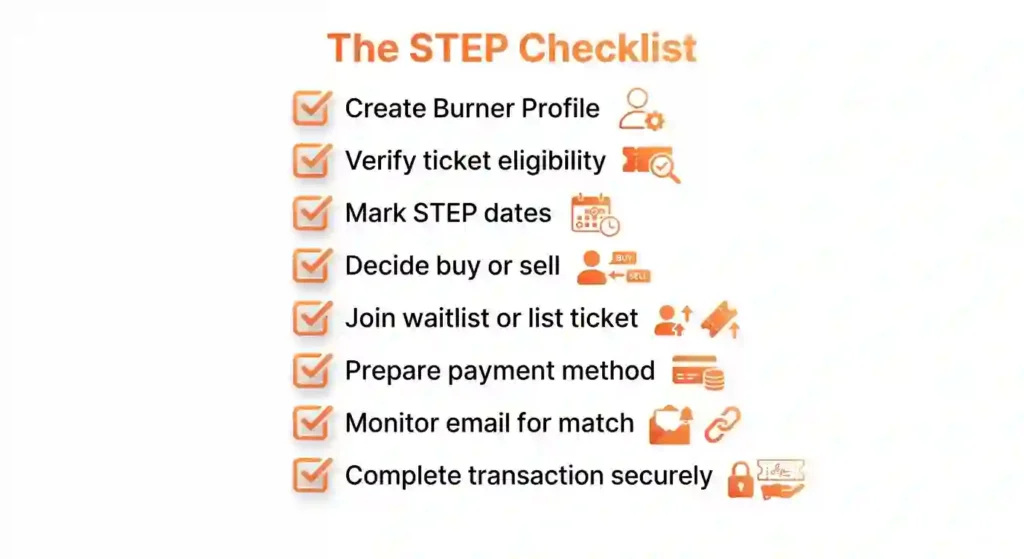
Before Joining STEP
Tasks: verify your STEP account, confirm billing/payout methods, match account name to event registration, gather ID docs, and set mobile alerts for STEP emails. If selling, ensure ticket transferability and payout setup are ready.
While Waiting
Tasks: monitor dashboard and email, keep cards active, prepare ID and verification docs, and coordinate camp backups. Avoid private purchases unless the seller is trusted and willing to transfer via STEP.
Before Payment
Tasks: confirm card limits, verify billing address, and ensure you can accept authorization holds. For sellers, double‑check that the ticket details are accurate and the bundle is correct.
After Receiving Tickets
Tasks: save confirmations, update your camp roster, book travel with refundable options, and double-check name/ID consistency. Notify camp leads and store receipts for reimbursements.
If Selling Tickets
Tasks: list correctly, verify payout settings, respond quickly to STEP prompts, and reconcile payouts. Archive all documentation for future reference.
- Verify accounts, cards, and names before joining STEP.
- Monitor communications and keep payment methods active while waiting.
- After transfer, save confirmations and update camp records.
- Sellers: verify payouts and list accurately to speed transactions.
Burning Man STEP Program — Quick FAQ
Ten tightly phrased FAQs cover the most important STEP topics and entities—STEP, Burner Profile, ticketing portal, vehicle passes, payments, LITP, international buyers, and scams. Answers are one to two sentences each.
Yes—STEP keeps transfers inside the official ticketing portal, tying tickets to verified Burner Profiles and secure payment rails to greatly reduce fake‑ticket and escrow scams.
Timing varies: some matches happen within minutes during reallocation waves, while other waitlist moves may take days or weeks depending on returned inventory and demand.
Yes if the ticket is eligible (most GA tickets); list only via the official portal and follow face‑value and add‑on disclosure rules—many LITP, artist, or credentialed tickets are restricted or blocked.
A STEP purchase is guaranteed once payment clears and the portal shows the ticket mapped to your verified Burner Profile; save the confirmation email and dashboard screenshot as proof.
Yes—international users with a verified Burner Profile can participate, but they should prepare for currency conversion, bank authorization holds, and cross‑border card issues.
Often no—many Low Income Ticket Program allocations are non‑transferable or tightly restricted; check the LITP approval notice and the portal before attempting to list.
The ticketing partner may apply small platform or transaction fees; the portal displays any fees and the seller’s net payout at listing/checkout.
Unsold tickets are requeued or returned to active listings for future reallocation waves; sellers retain ownership and can relist per portal rules.
Only buy or sell through the official ticketing portal (burningman.org/STEP), verify Burner Profiles, avoid wire/crypto or off‑portal payments, and never share OTPs or login credentials.
No—each person should have their own verified Burner Profile; duplicate or shared profiles create verification conflicts and can block transfers.
Where Should You Go Next?
| If You Want To… | Read This Guide |
| Learn how to register | → Burning Man Registration Guide |
| Compare official ticket options | → Ticket Types Guide |
| Understand Vehicle Pass requirements | → Vehicle Pass Guide |
| Check financial assistance options | → Low Income Ticket Program Guide |
| Protect yourself from ticket fraud | → Ticket Scam Prevention Guide |
| Return to the complete ticket overview | → Burning Man Tickets Guide |
Why Trust This STEP Guide?
- ✅ Based on official Burning Man STEP policies and published exchange information.
- ✅ Updated for the 2026 ticket season.
- ✅ Explains the official exchange process without promoting unofficial resale platforms.
- ✅ Designed to help both buyers and sellers understand their responsibilities.
- ✅ Links to additional official ticket resources for complete planning
Conclusion
The Secure Ticket Exchange Program offers participants an official and safer alternative for buying or returning eligible Burning Man tickets after regular sales. While availability depends on supply and demand, understanding how STEP works helps you prepare realistic expectations and use the exchange correctly.
STEP is the community’s most reliable tool for safe ticket exchanges—use it thoughtfully as part of your overall ticketing plan.
STEP Is the Safest Way to Exchange Burning Man Tickets
STEP provides documented transfers, reduces fraud, and preserves face-value trading norms. When you want legitimacy and gate peace-of-mind, STEP is the route to take. It’s the community‑sanctioned method—use it and encourage others to do the same to keep the marketplace healthy.
Patience and Preparation Improve Your Chances
Verified accounts, current payment methods, early waitlist joins, and calm contingency planning all improve STEP outcomes. Panic‑driven private deals rarely end well; being prepared reduces stress and increases your odds of a successful match.
Use Official Channels for Peace of Mind
Prioritize STEP, official announcements, and camp coordination over social media or resellers. Official channels give you support, documentation, and recourse—things private sellers can’t reliably provide. Your peace of mind at the gate is worth the small fees and the wait.
- STEP is the community-backed, documented exchange—prefer it for safety.
- Preparation and patience materially increase success odds.
- Use official channels and document everything for gate verification.
Final Thoughts
A friendly closing note—treat STEP as a community tool, not just a marketplace.
- 🔄 Join STEP only through official Burning Man channels.
- 🎟️ Understand that ticket availability depends on participant demand.
- 📧 Watch your email for updates and exchange notifications.
- 💳 Keep your payment information accurate and current.
- 🚗 Remember to plan for a Vehicle Pass if you’re driving.
- 🛡️ Avoid unofficial resale websites whenever possible.
- 📖 Continue learning about the remaining ticket guides before making travel plans.
Every Successful Exchange Starts With Trust
STEP is built on the idea that burners can transact responsibly. Whether buying or selling, be honest, responsive, and courteous—good behavior keeps the platform viable for everyone. When you sell, price ethically; when you buy, verify promptly.
Stay Flexible Throughout the Ticket Season
Ticketing seasons are dynamic—step changes in supply and demand occur. Keep multiple options and timelines, and avoid non-refundable commitments until you hold confirmed tickets. Flexibility reduces stress and keeps your trip realistic.
Let STEP Help You Reach Black Rock City Safely
If your plans change or you missed the sale, STEP is your best community-backed route to reclaim or buy a ticket at face value. Use it, prepare well, and keep communication open with your camp to ensure a smooth arrival.
- Treat STEP as a communal safety tool—act ethically and keep communication open.
- Maintain flexibility and layered backup options during ticketing season.
- Use STEP for safe transfers and confirm everything before travel.