
Burning Man Technology, Power & Communication Guide 2026: Charging Devices, Staying Connected & Desert Tech
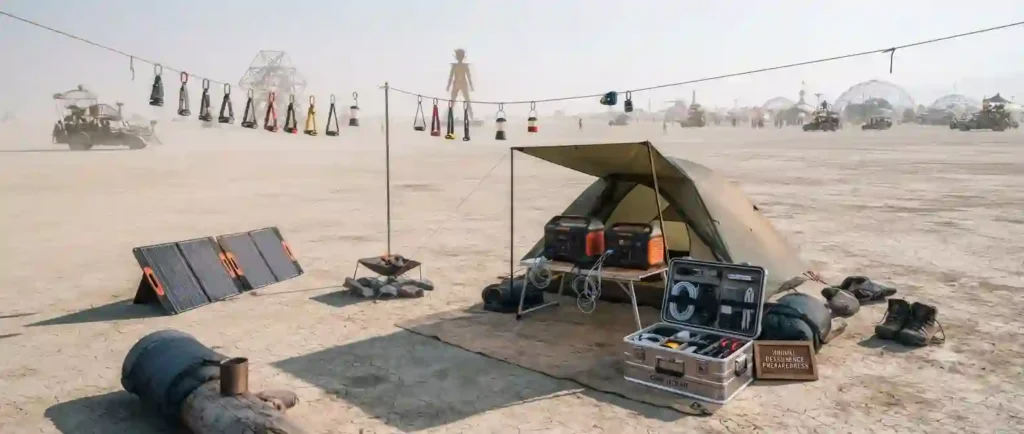
Black Rock City has no public power grid or cell infrastructure, so running phones, cameras, and lights takes real planning. This guide covers solar and battery charging, offline navigation, and protecting electronics from alkaline dust. Plan power the same way you plan water.
Black Rock City runs without municipal electricity or reliable cell coverage, which means every phone charge, camera battery, and string of camp lights depends on power you bring yourself. Fine alkaline dust also works its way into device ports and seams, making protection as important as charging capacity.
This guide covers solar charging setups, portable power stations and battery banks, offline maps and GPS since cell data is unreliable on playa, camera and laptop protection from dust, and realistic communication options for staying in touch with your camp and the outside world.
This guide covers power and connectivity specifically, not camping or medical preparation. For camp electrical and generator safety, see the Camp Safety & Fire Protection guide; for dust protection for gear generally, see the Dust, Eyes & Breathing Protection guide.
In This Guide You’ll Learn
- 🔋 Portable power planning
- ☀️ Solar charging systems
- 🔌 Portable batteries and power stations
- 📱 Phones and mobile devices
- 📍 GPS and offline navigation
- 📷 Cameras and photography equipment
- 💻 Laptops and electronic devices
- 📡 Communication options on the playa
- 🌬️ Protecting electronics from dust
- 🔗 Related survival resources
Why Technology Planning Matters at Burning Man
Technology planning matters at Burning Man because the event is a temporary city with extreme environmental conditions, limited infrastructure, and a culture of radical self-reliance. People arrive with expectations shaped by everyday life — instant connectivity, abundant power, and reliable devices — and must adjust for the reality of a remote desert environment where those expectations often don’t hold. Planning technology needs ahead of time reduces stress, prevents avoidable failures, and keeps the focus on participation, creativity, and community. A clear plan helps prioritize essentials, conserve power, protect gear from dust and heat, and prepare contingency communication methods for safety and coordination.
Technology in a Temporary Desert City
On the playa, structures and services exist only for the event’s duration. There is no built-in grid access for most camps, and public infrastructure like cell towers and Wi-Fi is limited or absent. People depend on portable solutions and collective arrangements within camps. The environment — alkaline dust, intense sunlight, temperature swings, and wind — directly affects technology performance and longevity. The temporary nature of the city also means backups and redundancy are crucial: battery systems can fail, devices can become lost or damaged, and connectivity can fluctuate. Building realistic expectations about what technology can and can’t do at Burning Man is the first step toward practical planning.
Balancing Connectivity and Self-Reliance
Burning Man encourages participants to be present and engaged rather than digitally tethered. Many people choose to limit connectivity intentionally, using technology only when it enables participation, safety, or documentation. Balancing the desire to stay reachable with the ethos of radical self-reliance means determining what level of connectivity is necessary: emergency contactability, navigation and meetups, capturing art and memories, or sharing selective updates after the event. The best plans prioritize essential communication and power for critical devices while treating other electronics as optional conveniences.
Common First-Timer Technology Mistakes
- Assuming cell service will match urban experience.
- Bringing too many gadgets without power planning.
- Forgetting protective measures against playa dust.
- Relying on a single device for navigation and photos.
- Neglecting simple backups like printed maps or written contacts.
Understanding Playa Conditions for Electronics
- Dust composition: The playa’s dust is fine, alkaline, and pervasive. It gets into crevices and can abrade, corrode, or short components.
- Temperature swings: Hot daytime and cold nights affect battery performance and condensation risks when moving between temperatures.
- Wind and storms: Sudden dust storms can coat devices quickly and may force sheltering.
- UV exposure: Extended sunlight can degrade plastics and screens; shading prolongs equipment life.
Building a Reliable Technology Plan
- Start with priorities: safety, communication, documentation.
- Audit devices: list each device, its purpose, battery capacity, and charging needs.
- Create redundancy: at least two ways to communicate and two charging sources if possible.
- Assign responsibilities within the camp: who maintains chargers, monitors shared batteries, and enforces dust protocols.
- Test systems beforehand: run a week-long simulation of planned device usage and charging cycles.
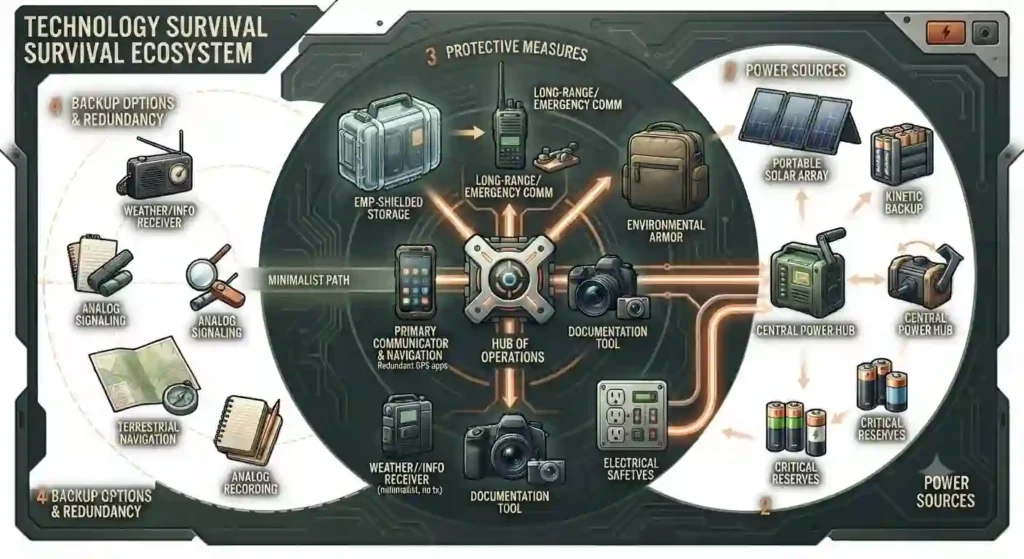
Visual #1 — Technology Survival Ecosystem
Caption: A visual map showing device categories (communication, power, documentation), power sources, protective measures, and backup options arranged in a survival ecosystem that emphasizes redundancy and minimalism.
What Electronic Devices Should You Bring?
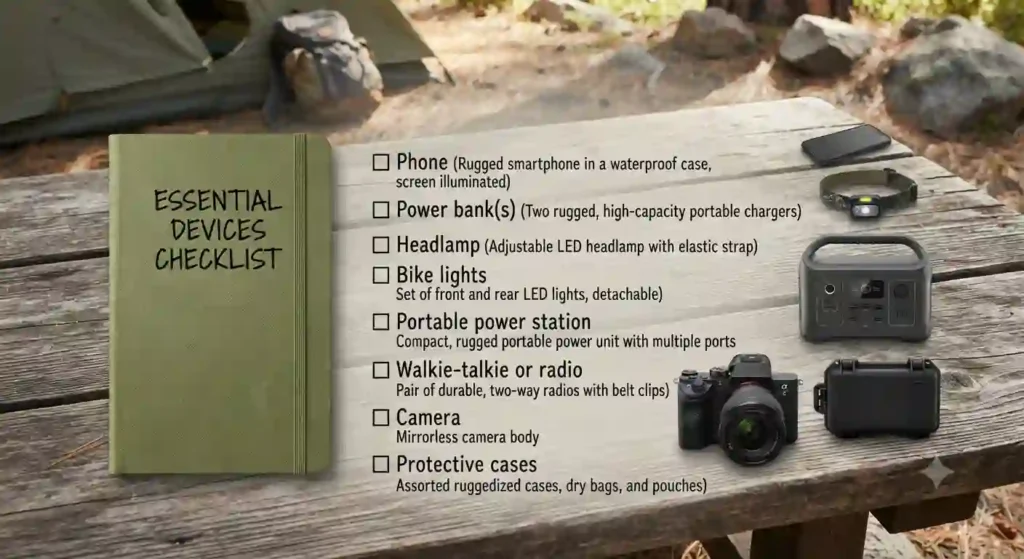
People should choose devices that serve clear purposes on the playa — safety, navigation, capturing memories, and basic convenience — and avoid carrying unnecessary equipment that increases power requirements and dust risk.
Smartphones and Essential Apps
- Primary uses: camera, maps and navigation, message apps, event apps or schedules, emergency contacts.
- App strategy: pre-download maps and materials for offline use; disable background updates and push-heavy social apps to conserve battery.
- Battery management: enable low-power modes, reduce screen brightness, turn off unnecessary radios (Bluetooth, Wi-Fi, NFC) when not in use.
Cameras and Photography Equipment
- Considerations: mirrorless and DSLR bodies are power-hungry and sensitive to dust; action cameras and compact cameras can be more resilient if properly protected.
- Storage: bring ample offline storage and a plan to offload or back up photos if desired.
- Power: treat cameras as high-priority items in charging schedules or rely on a single backup battery.
GPS and Navigation Devices
- Dedicated GPS units can be useful for long rides and as a redundant navigation tool.
- Offline options: download offline map tiles on phones and bring paper maps and written coordinates for camp, medical, and key art installations.
- Battery: GPS units and phone navigation both drain power; pairing them with portable power sources is essential.
Tablets and E-Readers
- Uses: reading, reference materials, event guides, and as a larger screen for media.
- Trade-offs: tablets consume significant power; they are less essential for many people and can be left at home unless needed for specific reasons like role-based operations or camp coordination.
Keeping Your Tech Setup Simple
- Minimalism reduces risk. People who prioritize a few reliable devices and plan power around them typically have a smoother experience than those bringing a device for every perceived use.
- The “less is more” approach aligns with the ethos of participation and frees people from constant charging and device management.
Technology Essentials at a Glance
| Technology Area | Best Practice |
| Phone | Download maps and important information before arriving. |
| Power Bank | Bring enough capacity to recharge essential devices. |
| Solar Charger | Useful for extending battery life during multi-day stays. |
| Camera | Protect equipment from dust and extreme temperatures. |
| GPS | Use offline maps rather than relying on internet access. |
| Batteries | Carry spare rechargeable batteries for critical equipment. |
| Lighting | Pack rechargeable headlamps and bike lights. |
| Electronics Storage | Keep devices in sealed bags or protective cases during dust storms. |
Do Phones and Internet Work at Burning Man?
People often ask whether their phones will function and whether there’s internet at Burning Man. The answers depend on expectations, carrier coverage, distance to infrastructure, and local solutions.
Understanding Cellular Coverage
- Base reality: the playa is remote. Coverage near the event can be sparse; cell providers may deploy temporary infrastructure, but it is variable and often prioritized for emergency services and staff.
- Home carrier matters: coverage varies by carrier and by participant location; some people report intermittent service within the event and stronger signals at the edges or nearby towns.
Why Service Can Be Unreliable
- Load: thousands of devices in a small area overload capacity even if towers exist.
- Terrain and interference: the flat playa can help signal travel, but antennas might be distant and obstructed by structures or crowds.
- Infrastructure limits: temporary or no cell sites, constrained backhaul to internet gateways, and satellite link congestion can all cause issues.
Mobile Data Expectations
- Expect limited bandwidth and intermittent connectivity. Data-heavy activities such as livestreaming, video calls, or large uploads may be impossible.
- Text messaging and low-bandwidth services may work at times but should not be relied upon for critical communication.
Internet Availability on the Playa
- Public Wi-Fi is uncommon for general participants. Some camps or theme camps may offer local networks for internal use, but these are typically limited in scope and not a substitute for broad internet access.
- Emergency and staff networks exist for official communications.
Offline Planning Strategies
- Pre-download event materials: maps, schedules, medical and emergency contacts, and important documents.
- Use offline messaging apps that support direct device-to-device communication if needed.
- Arrange meeting points and times in advance, and carry paper backups like written camp directions and playa coordinates.
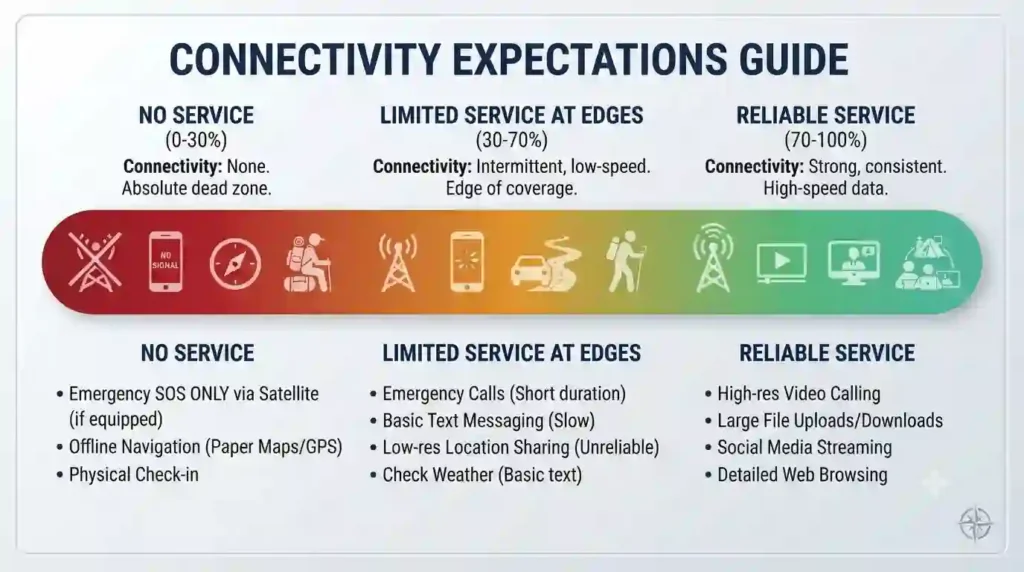
Visual #3 — Connectivity Expectations Guide
Caption: A simple gradient chart from “No service” to “Limited service at edges” that maps where connectivity is most likely and what activities are realistic at each level.
How Do You Keep Devices Charged All Week?
Charging devices across the week on the playa requires estimating consumption, prioritizing devices, adopting daily habits, and building a schedule that matches power availability.
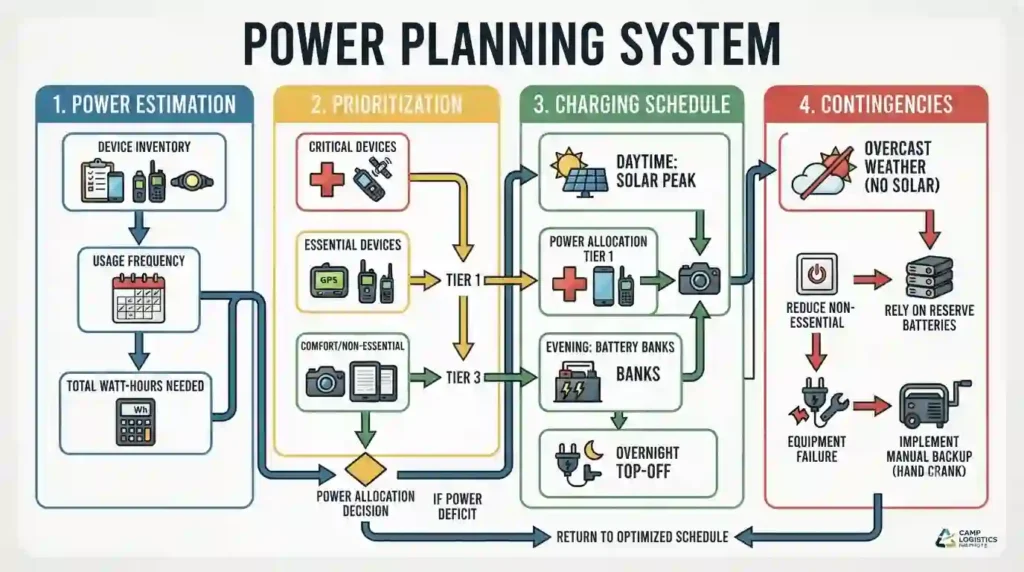
Estimating Your Power Needs
- List each device with battery capacity and estimated daily usage. Include phone, headlamp, lights, cameras, GPS units, and any camp appliances.
- Convert device consumption into watt-hours where possible for accurate planning: batteries and power stations are typically rated in watt-hours. This helps allocate power realistically across days.
Charging Priorities for Essential Devices
- Safety and communication devices come first: phones for emergency calls and messages, headlamps, bike lights, and radios.
- Next: devices for documentation and camp operations like cameras and tablets.
- Low-priority items: personal comfort devices and extras like secondary e-readers or nonessential speakers.
Daily Power Management Habits
- Charge during the sunniest part of the day if using solar; otherwise, recharge at planned times.
- Turn off radios and devices when not in use.
- Keep devices in low-power modes and carry power banks for quick top-ups.
Building a Charging Schedule
- Create a daily schedule aligning with solar availability, shared charging resources, and sleep or quiet hours.
- Assign camp charging shifts and a written log to track who used communal batteries and to manage fairness.
- Plan longer charging sessions for high-capacity batteries during mid-day sun or camp downtimes.
Avoiding Midweek Power Shortages
- Encourage conservative charging practices early in the week; avoid full consumption on day one.
- Monitor charge levels collectively and ration nonessential charging if shortages risk critical devices.
- Have a contingency small-capacity reserve for emergencies.
What Are the Best Portable Power Solutions?
People should match power solutions to priorities and be realistic about capacity, recharge times, and environmental limitations.
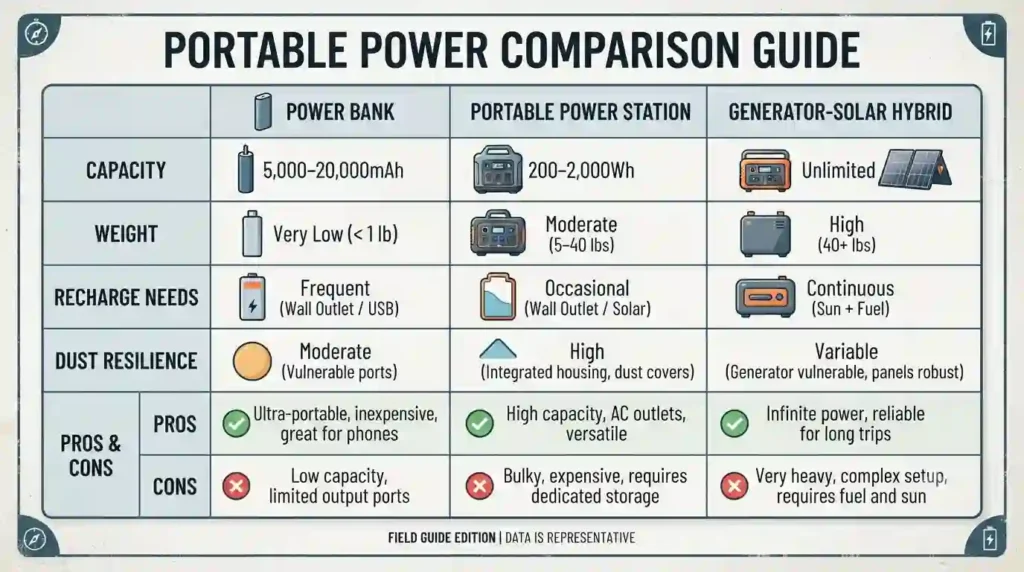
Power Banks and Battery Packs
- Useful for phones, small cameras, and headlamps.
- Consider capacity in watt-hours rather than milliamp-hours for easier comparisons.
- Keep power banks protected from dust, and store them at moderate temperatures to preserve capacity.
High-Capacity Portable Power Stations
- These units can power multiple devices and small appliances for camp use. They are heavy and must be managed carefully.
- Key considerations: total watt-hours, available output types (USB, AC, DC), and recharging methods.
- They require a plan for recharging — either via solar, a generator, or pre-charged rotation with communal resources.
Choosing the Right Battery Capacity
- Match the total watt-hours to estimated daily usage and the number of days without recharge opportunities.
- Factor in inefficiencies: inverter losses, cable losses, and charging rate limitations mean usable capacity is often less than advertised.
Charging Multiple Devices
- Use power strips (with surge protection where applicable) at stations to centralize charging and reduce forgotten devices.
- Avoid daisy-chaining power strips outdoors without shelter; protect connections from dust and intermittent weather.
Emergency Backup Power Options
- Keep a small secondary power source reserved strictly for emergencies — a compact power bank or a dedicated emergency battery.
- Store it with clear instructions and an assigned keeper to avoid casual depletion.
Are Solar Chargers Worth Bringing?
Solar is appealing on the playa because of abundant sun, but it comes with caveats and realistic limitations.
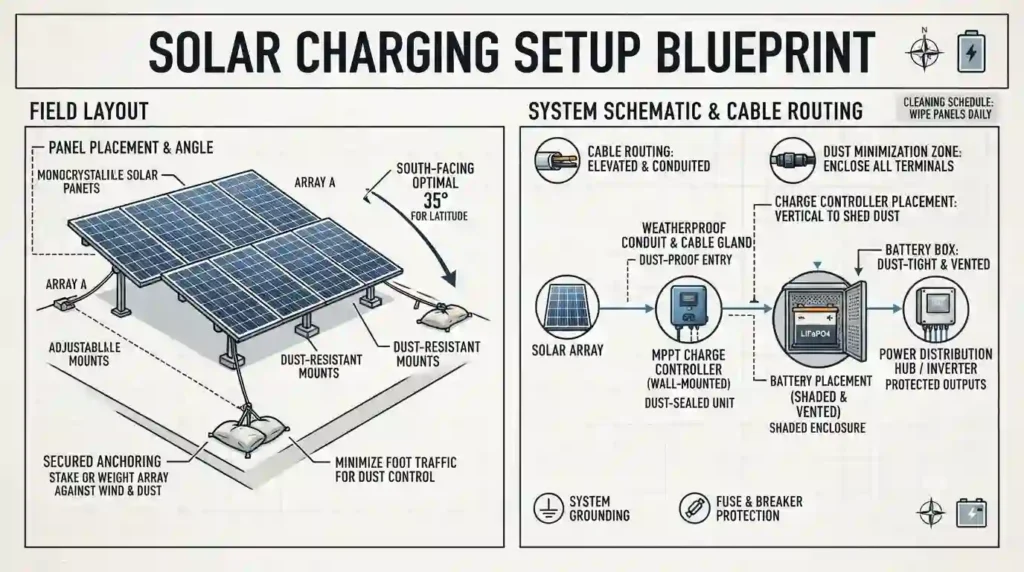
How Solar Charging Works on the Playa
- Solar panels convert sunlight into electricity, charging batteries or power stations directly or through charge controllers.
- Efficiency depends on panel angle, shading, and cleanliness. Dust accumulation reduces output significantly, so panels require periodic cleaning.
Portable Solar Panels
- Foldable panels and rigid panels are common; they are lightweight but must be secured against wind.
- They produce power only during daylight hours and are subject to weather interruptions and dust coverage.
Solar Generator Systems
- These include a battery bank, inverter, and integrated charge controller. They enable storage of solar energy for nighttime use.
- They provide autonomy but add weight, complexity, and a need for a protected storage and charging spot.
Advantages and Limitations of Solar Power
- Advantages: renewable, quiet, and scalable for many low-to-medium power uses.
- Limitations: variable output, dependence on clean panels, and diminished return during storms or heavy dust. Recharge times can be long for large batteries.
Best Uses for Solar Energy
- Topping up phones, charging headlamps, running small electronics, and maintaining battery stations.
- Good as part of a mixed approach — solar supplemented by pre-charged batteries or communal generators when necessary.
Visual #6 — Solar Charging Setup Blueprint
Caption: A layout showing panel placement, angle recommendations, secured anchoring, charge controller, battery placement (shaded), and cable routing while minimizing dust exposure.
What Lighting Equipment Do You Need?
Lighting is essential for safety, identification, and mobility after dark. Planning covers personal, bike, and camp-level illumination.
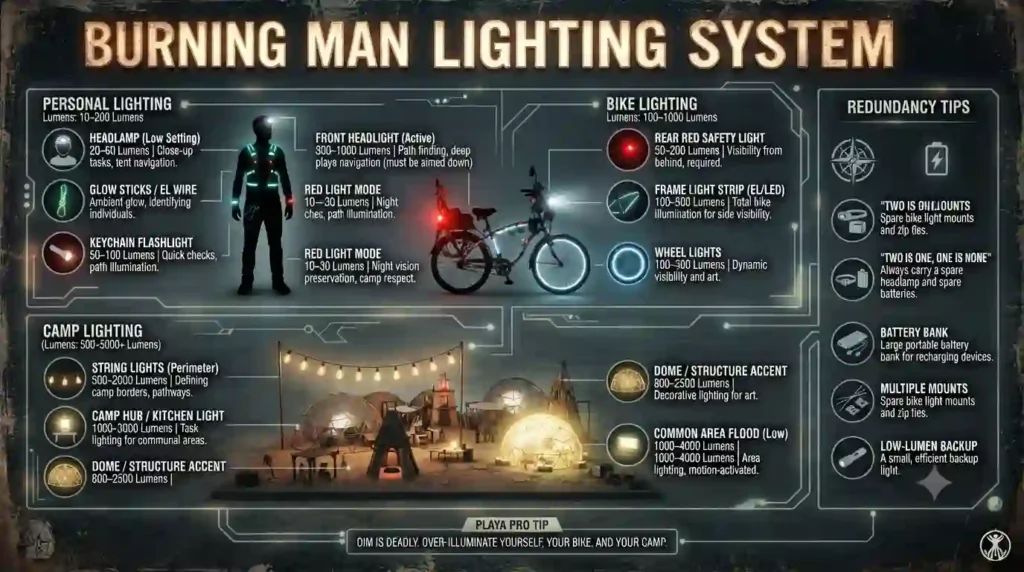
Why Lighting Is Essential for Safety
- Visibility reduces collision risk on foot and bike and helps first responders locate people in emergencies.
- Lighting supports navigation between camps and identifies shared spaces at night.
Headlamps and Personal Lighting
- Headlamps keep hands free and provide directed light for tasks. People should carry spare batteries or a backup power source.
- Wearable LED lights, reflective gear, and glow markers increase visibility.
Camp Lighting Solutions
- Diffused camp lighting creates safe shared spaces without producing blinding hotspots. Battery-powered lanterns and string lights on low-power settings work well.
- Avoid excessive or disruptive bright lights; many camps coordinate lighting to preserve night sky and participant comfort.
Bicycle Lighting Requirements
- Bikes need front and rear lights visible from a distance, and additional side visibility or spoke lights for lateral detection.
- Use robust mounting and protective housings because dust and vibration can dislodge lights.
Backup Lighting Strategies
- Multiple small light sources reduce the risk of complete darkness if one device fails.
- Have a central camp stash of spare headlamps and lanterns for guests and emergencies.
How Can You Protect Electronics From Dust?
Protecting electronics is a priority. Playa dust is relentless, so prevention, careful storage, and cleaning practices matter.
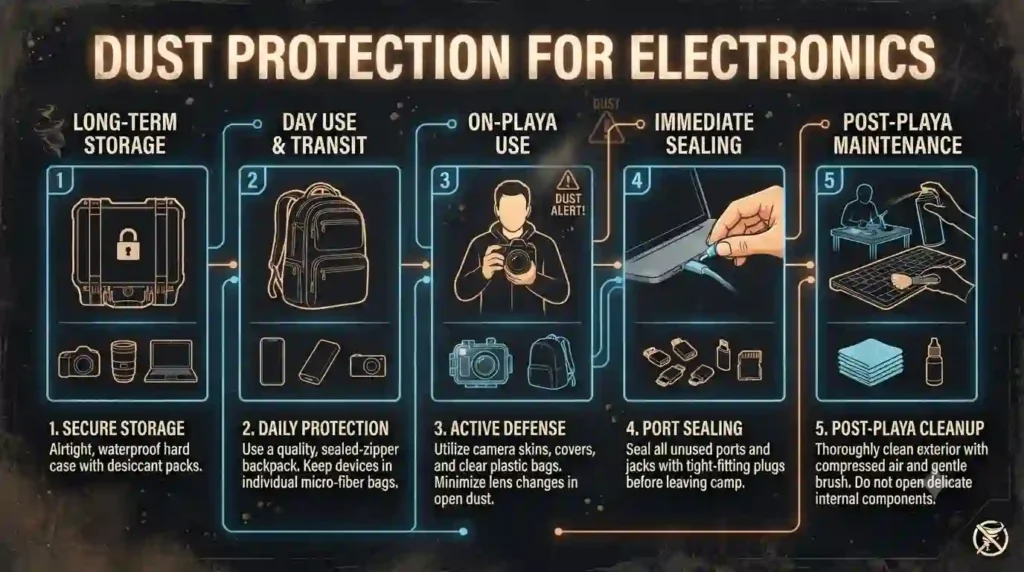
Risks of Playa Dust for Devices
- Dust abrades mechanical switches, clogs cooling vents, corrodes contacts, and leaves residues that attract moisture. It can sneak into seams and compromise internal components over time.
Protective Cases and Storage
- Use sealed, dust-resistant cases for valuable equipment. Plastic bins with gasket seals or zip-lock bags for small items are effective.
- Keep electronics off the ground, under shade, and in closed containers when not in use.
Cleaning Electronics Safely
- Use brushes and low-pressure air to remove loose dust; avoid high-pressure blowers that can force dust deeper.
- Soft, dry microfiber cloths remove surface residue. For stubborn alkaline dust, gentle dampening with distilled water on a cloth can help — apply to the cloth, not the device, and fully dry devices before powering them.
Preventing Dust Damage
- Set up a dedicated cleaning station at camp for equipment maintenance.
- Avoid charging or using devices in dusty environments when possible; move to a sheltered, cleaner area.
- Seal ports with tape or port covers to block dust ingress.
Long-Term Device Care After Burning Man
- Thoroughly clean devices after leaving the playa; open battery compartments and clean contacts.
- Allow devices to dry completely before charging. Consider professional servicing for high-value gear if problems appear post-event.
What Communication Methods Work Best on the Playa?
A combination of pre-planned meetings, low-dependency radios, and local camp systems delivers reliable communication without relying solely on cellular networks.
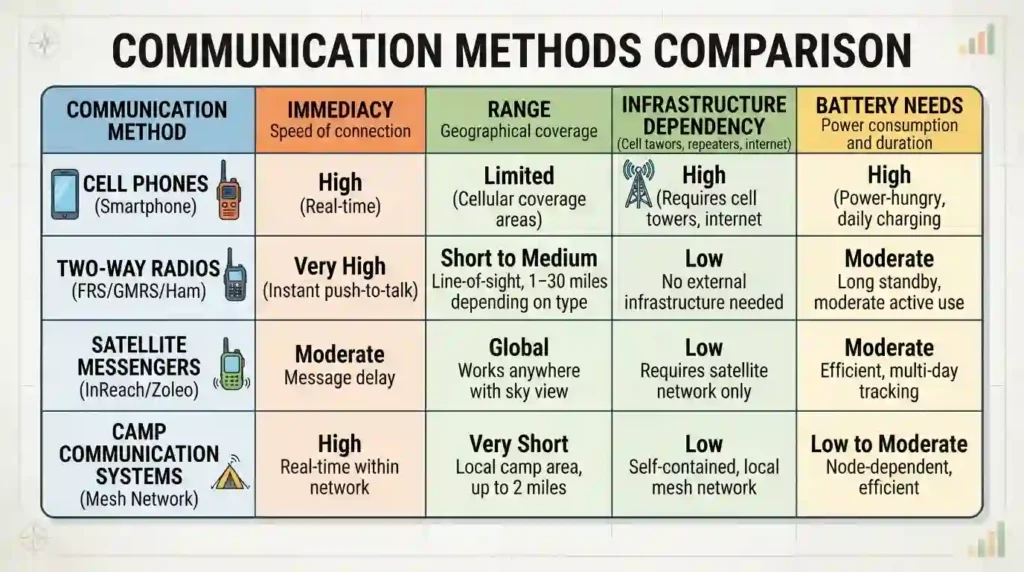
Meeting Plans and Communication Strategies
- Establish fixed meeting points and schedules for people to check in throughout the day.
- Share camp coordinates and written contact lists with visitors and newcomers.
- Use simple event-day protocols: a primary meeting time each evening and a secondary fallback time.
Walkie-Talkies and Radios
- Two-way radios (walkie-talkies) and FRS/GMRS-style devices often work well at short ranges and within line-of-sight conditions common on the playa. They provide instant communication without cellular dependency.
- Consider channel coordination to avoid interference, and keep radios on simple, low-energy settings when not actively used.
Camp Communication Systems
- Camps often set up central communication hubs for internal coordination: message boards, a central radio base, and a designated communication steward.
- Internal Wi-Fi or local mesh networks can provide intra-camp messaging and media sharing without internet access.
Emergency Communication Methods
- Official event channels and staffed medical and public safety stations are primary for serious emergencies.
- Satellite-based personal emergency devices provide an additional layer for remote solo trips or essential safety kits; these devices typically transmit coordinates and pre-defined messages to emergency services.
Staying Connected Without Reliable Cell Service
- Rely on pre-arranged plans, radios for immediate coordination, and written backups.
- Keep expectations realistic: plan to be unreachable by general social networks but reachable within the camp via designated systems.
What Technology Mistakes Do First-Timers Make?
Avoiding common pitfalls improves the experience and preserves gear.
Bringing Too Many Devices
- Extra devices multiply charging needs and increase the chance of loss or damage. Minimal setups reduce cognitive load and power consumption.
Underestimating Power Requirements
- Failing to calculate watt-hour needs leads to midweek shortages. Estimate realistically and add a safety margin.
Failing to Protect Electronics
- Leaving devices exposed or uncleaned causes irreversible damage. Implement simple protective routines.
Relying Entirely on Mobile Networks
- Expect outages and build non-cellular backup plans for crucial communication and navigation.
Forgetting Backup Communication Plans
- Without meetup plans or radios, people can become stranded or lost. Establish clear, simple protocols.
Visual #10 — Tech Mistakes vs Smart Solutions
Caption: A split-panel visual showing common errors on the left and practical fixes on the right.
How Do Experienced Burners Use Technology Effectively?
Veteran participants tend to simplify, prioritize, and integrate communal support to manage tech needs efficiently.
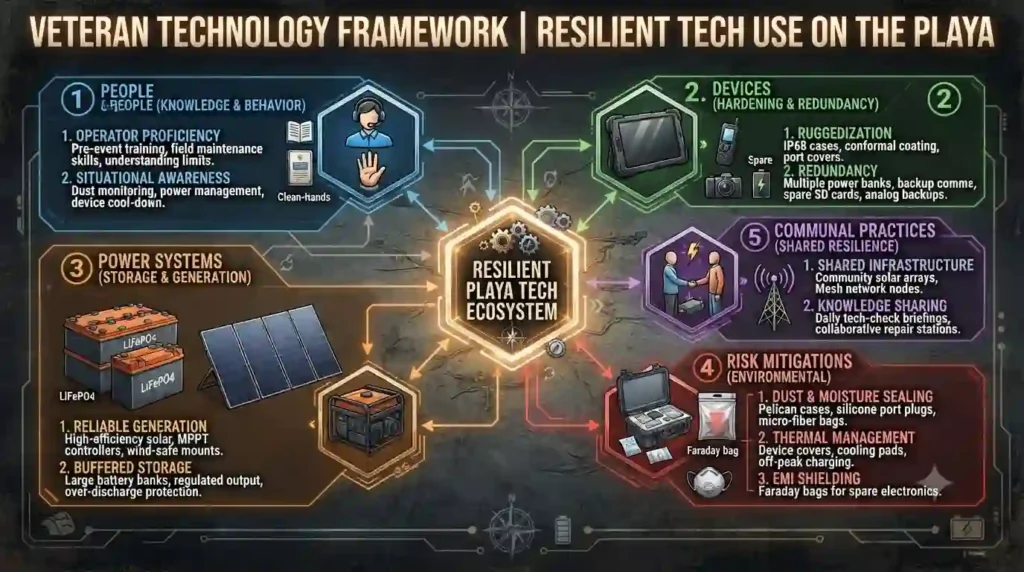
Veteran Power Management Strategies
- Shared resources: camps pool power into centralized stations with agreed-upon schedules and logging.
- Conservative use: veterans avoid frivolous power use and set community norms for charging.
- Rotational charging: camps rotate who charges high-demand devices to spread load.
Minimalist Technology Setups
- Many experienced Burners reduce gear to a phone, headlamp, bike lights, a single power bank, and cameras only when necessary.
- Off-grid habits: trading constant online presence for planned, occasional check-ins.
Reliable Communication Habits
- Simple protocols: fixed meeting times and fallback locations; radios for short-range coordination; designated contact people for guests and new camp members.
- Training: regular camp briefings on radios and safety devices ensure everyone knows how to use them.
Protecting Equipment Throughout the Week
- Regular cleaning rituals, storage routines, and buddy checks help preserve devices.
- Veterans often maintain a “tech box” — a small kit with basic spares, batteries, cable ties, and cleaning supplies.
Lessons Learned From Previous Burns
- Expect the unexpected: storms, lost gear, and battery failures happen.
- Test new gear at home before relying on it at Burning Man.
- Keep redundant options for anything critical to safety or communication.
Technology & Communication in Numbers
Black Rock City is an off-grid city where electricity, internet, and mobile service are limited. These numbers highlight the most important technology and communication facts for staying connected and powered during the event.
Key Numbers
📍 Offline Maps Recommended — Download maps before arriving because internet access is limited.
🔋 2–3 Power Banks — Carry backup batteries for phones and essential devices.
☀️ 100–200W Solar Panel — Common portable size for charging small electronics.
📵 Limited Cell Service — Mobile coverage is unreliable and varies by carrier.
📻 FRS/GMRS Radios — Useful for keeping groups connected across the playa.
🔦 2 Light Sources — Carry a headlamp plus a backup flashlight every night.
⚡ 10,000–20,000mAh — Recommended minimum power bank capacity.
🌬️ Dust-Proof Storage — Protect phones, cameras, and laptops from alkaline dust.
Common Myths vs Reality About Technology at Burning Man
| Myth | Reality |
| My phone will always have service. | Cell coverage is limited and often unreliable, especially during busy periods. |
| I can charge my phone anywhere. | There are no public charging stations throughout the city; bring your own power solution. |
| One power bank is enough. | Heavy phone, camera, and GPS use often requires multiple backup batteries. |
| Electronics are safe in tents. | Fine alkaline dust can quickly damage phones, cameras, laptops, and drones if left unprotected. |
| Online maps always work. | Download offline maps before arriving because internet access may not be available. |
| Wi-Fi is available across the playa. | Public Wi-Fi is not available throughout Black Rock City. |
Frequently Asked Questions About Technology and Power
Phones may work intermittently. Incidents of reliable service vary with location, carrier, and event infrastructure. People should prepare to be offline and use phones primarily for offline functions and emergency backups.
Amount depends on device count and usage. Estimate total daily watt-hour needs and bring enough capacity to cover several days without recharge, plus a small emergency reserve. Conservative planning often outperforms optimistic estimates.
Solar is useful as part of a mixed strategy but requires maintenance and realistic expectations. Solar shines as a quiet, renewable option for topping up devices and replenishing small-to-moderate battery stations during clear weather.
Lighting for bikes and personal navigation is essential. Headlamps and clearly visible bike lights are effectively required by safety norms and event guidelines. Camp lighting should be considerate and safe.
Walkie-talkies work without cellular networks and are often more reliable for short-range coordination. They are not a full replacement for phones but are a valuable redundancy and immediate communication tool.
Use sealed cases and storage bins, clean devices with gentle tools, and avoid exposing ports and vents. Establish a camp cleaning routine and clean equipment thoroughly after leaving the playa.
No. Burning Man does not provide public Wi-Fi across the city, although some camps may operate private networks.
Yes. Most experienced Burners carry multiple high-capacity power banks because charging opportunities are limited.
Yes. GPS works normally, and offline maps are highly recommended for navigation without internet access.
Some camps and media teams may use private Starlink systems, but they are not public internet services for all participants.
Do not rely on charging inside Black Rock City. Plan your route carefully and fully charge your EV before arriving, using charging stations outside the event.
Why Trust This Technology Guide?
✅ Links to related survival and camp safety resources.
✅ Based on official Burning Man preparation guidance and practical desert camping experience.
✅ Updated for the 2026 Burning Man season.
✅ Covers technology planning for both beginners and experienced participants.
✅ Focuses on reliable power, communication, navigation, and equipment protection.
Final Thoughts on Technology Survival
Prioritizing Essential Devices
The most successful tech plans focus on essentials: safety, lighting, navigation, and a minimal documentation setup. Everything else is secondary.
Building Reliable Power Systems
A mixed approach — combining small personal power banks, a communal battery station, and optional solar — typically balances convenience and reliability. Careful capacity planning and clear usage rules keep systems functioning.
Preparing for Limited Connectivity
Plan meetings, download offline materials, and adopt low-dependency communication habits. Expect to be unplugged and embrace the benefits of in-person connection.
Protecting Equipment From Playa Conditions
Treat devices as tools that need care: protect them from dust, temperature extremes, and mechanical stress. Simple prevention extends device life and reduces anxiety.
Using Technology Without Depending on It
Technology can augment the Burning Man experience without dominating it. By focusing on self-reliance, redundancy, and simple systems, people can stay safe, document their time, and participate fully without being tethered to a grid.
- 🔋 Estimate your total power needs before leaving home.
- ☀️ Consider solar charging for longer stays.
- 📱 Download important maps and information for offline use.
- 📷 Protect cameras and electronics from alkaline dust.
- 🔌 Carry backup batteries and charging cables.
- 📡 Don’t rely on continuous internet or cellular service.
- 🧰 Store electronics safely when dust storms arrive.
- 📖 Continue reading the Camp Safety Guide for safe power management at your campsite.
Technology & Communication Checklist
Before Leaving Camp
✅ Fully charge your phone
✅ Carry one or two backup power banks
✅ Download offline maps
✅ Save emergency contact information offline
✅ Pack charging cables
✅ Carry a headlamp and backup flashlight
✅ Store electronics in dust-proof bags or waterproof cases
✅ Bring spare batteries if using radios
✅ Test solar chargers before the event
✅ Share your day’s destination with campmates
Conclusion
Technology should support your Burning Man experience—not create unnecessary stress. By planning your power needs, protecting electronics from dust, using offline navigation, and preparing reliable communication methods, you can enjoy the benefits of modern technology while adapting to the unique conditions of Black Rock City.
Where Should You Go Next?
| If You Want To… | Read This Guide |
| Build a safe powered campsite | → Camp Safety & Fire Protection Guide |
| Protect electronics from dust | → Dust, Eyes & Breathing Protection Guide |
| Navigate Black Rock City | → Transportation Survival Guide |
| Prepare for emergencies | → Health, Medical & Emergency Guide |
| Return to the complete overview | → Burning Man Survival Guide |